Orderbook Heatmap
One liquidity heatmap across exchanges, with months of history, right on your chart
Help: How to read the Orderbook Profile
Learn: Liquidity Heatmap vs Liquidation Heatmap
Tabmydata's Orderbook Heatmap turns resting order-book liquidity from the futures exchanges you pick into colour behind your candles, with months of history you can scroll back on 93 instruments, from BTC to tokenized stocks and gold. See each exchange's size at each price in one click. Free during Alpha.
Free during Alpha. Shows where liquidity sat, not a forecast.
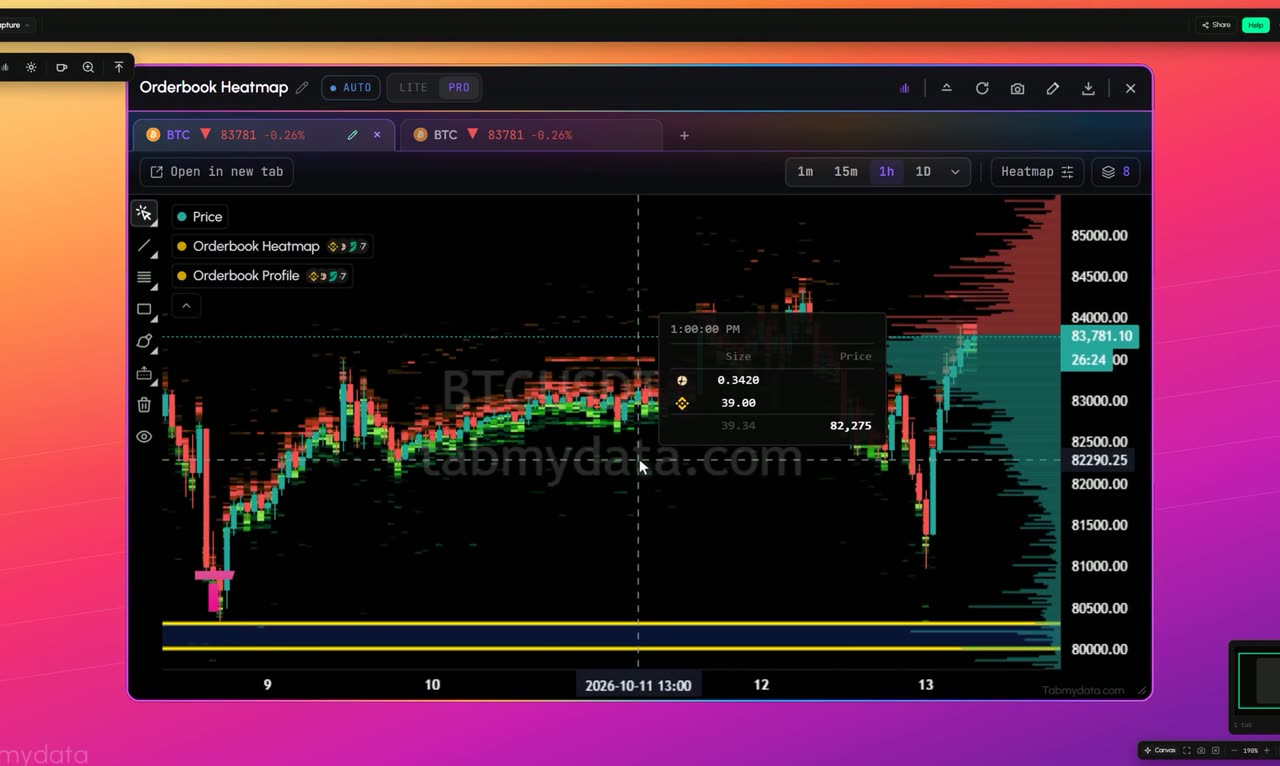
What's happening
Depth across exchanges
Resting order-book liquidity from the exchanges you pick, merged into one colour heatmap. Brighter means bigger size at that price.
Product tour
What you can do in the Orderbook Heatmap tab
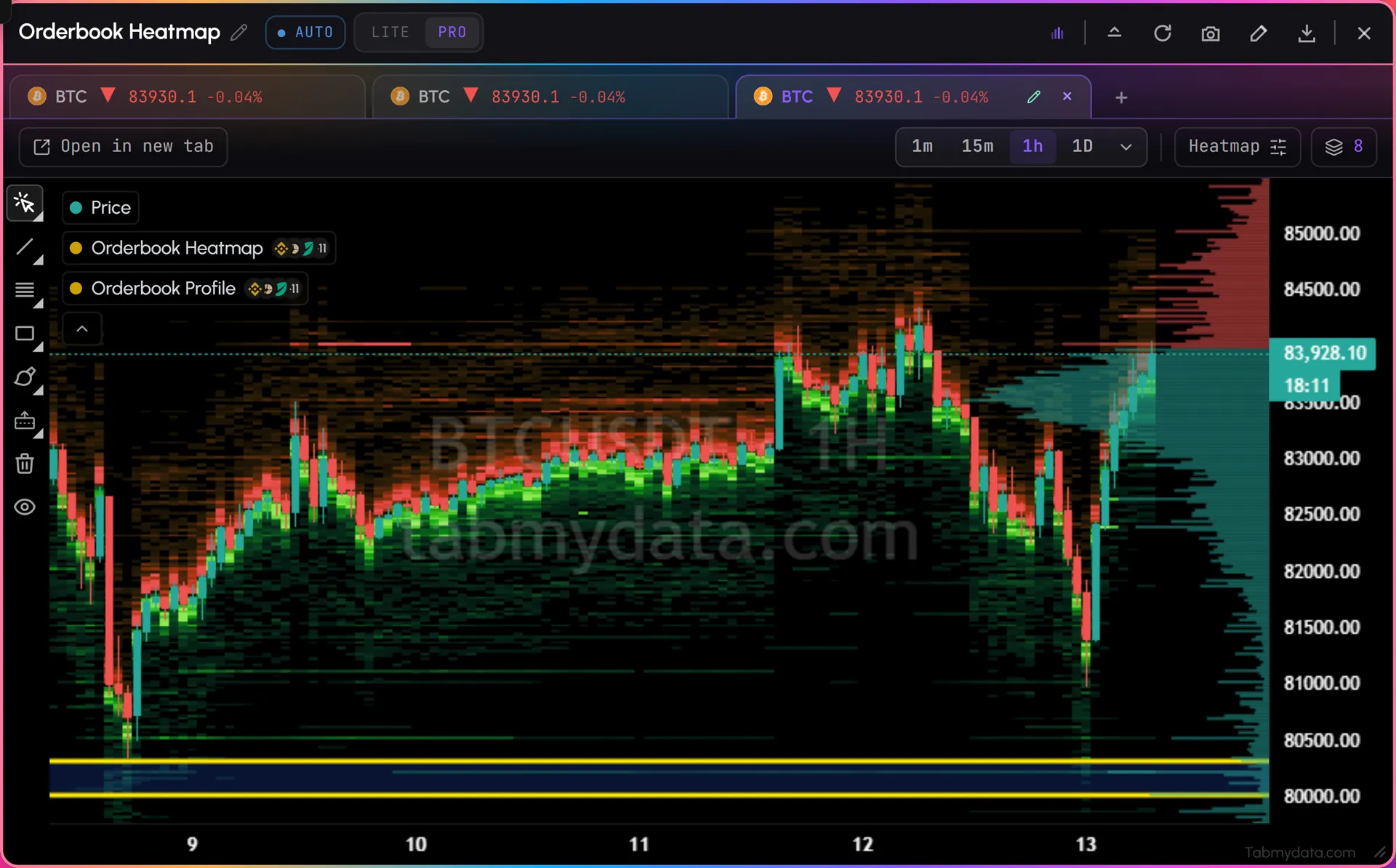
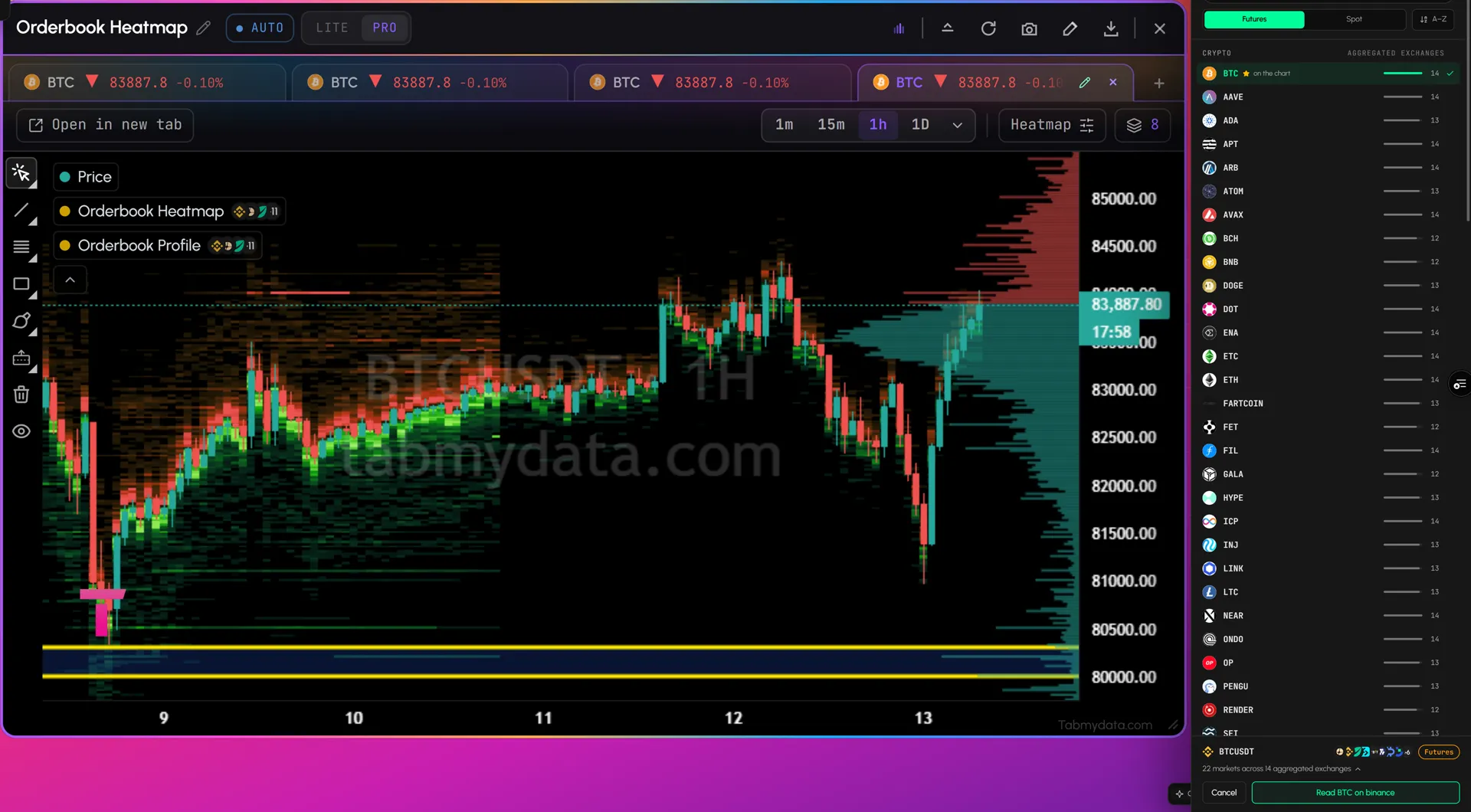
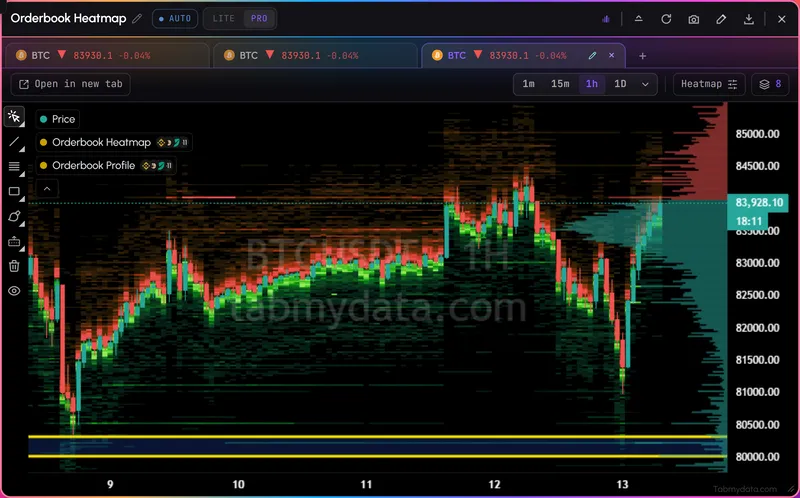
The Orderbook Heatmap draws resting order-book liquidity as colour over time, behind the candles. Bright bands are big size at a price. Thin areas are gaps.
Merge the futures exchanges you choose into one view, across 93 instruments: crypto, tokenized stocks and ETFs, and commodities such as gold. Scroll back and see how liquidity built up or cleared last week, not only right now.
It shows where liquidity sat and how big. It is not a forecast.
For any other coin, the live order book merged from the exchanges you choose shows depth right now.
Features
- 01
See it at a glance
Resting liquidity from the exchanges you pick, merged into one colour heatmap over time: an aggregated order book heatmap (see aggregated order book).
- Liquidity? See it as colour behind the candles.
- Size? Brighter means bigger size at that price.
- Gaps? Thin areas show where little size sat.
- Strength? Scroll back and watch liquidity build up or disappear.
- Exchanges? Pick from 24+ and merge them in one view.
- Your instrument? 93 instruments, from BTC to tokenized stocks and gold.
- 02
Scroll back for months
Pan back through months of history and see how liquidity built up or cleared. It is recorded for the instruments in the picker and keeps growing.
- 03
Right on your chart
Candles run through the heatmap, so you see liquidity and price together in one view. Many traders watch levels like these as support and resistance. That is a reading, not a promise of what price will do.
- 04
Orderbook Profile
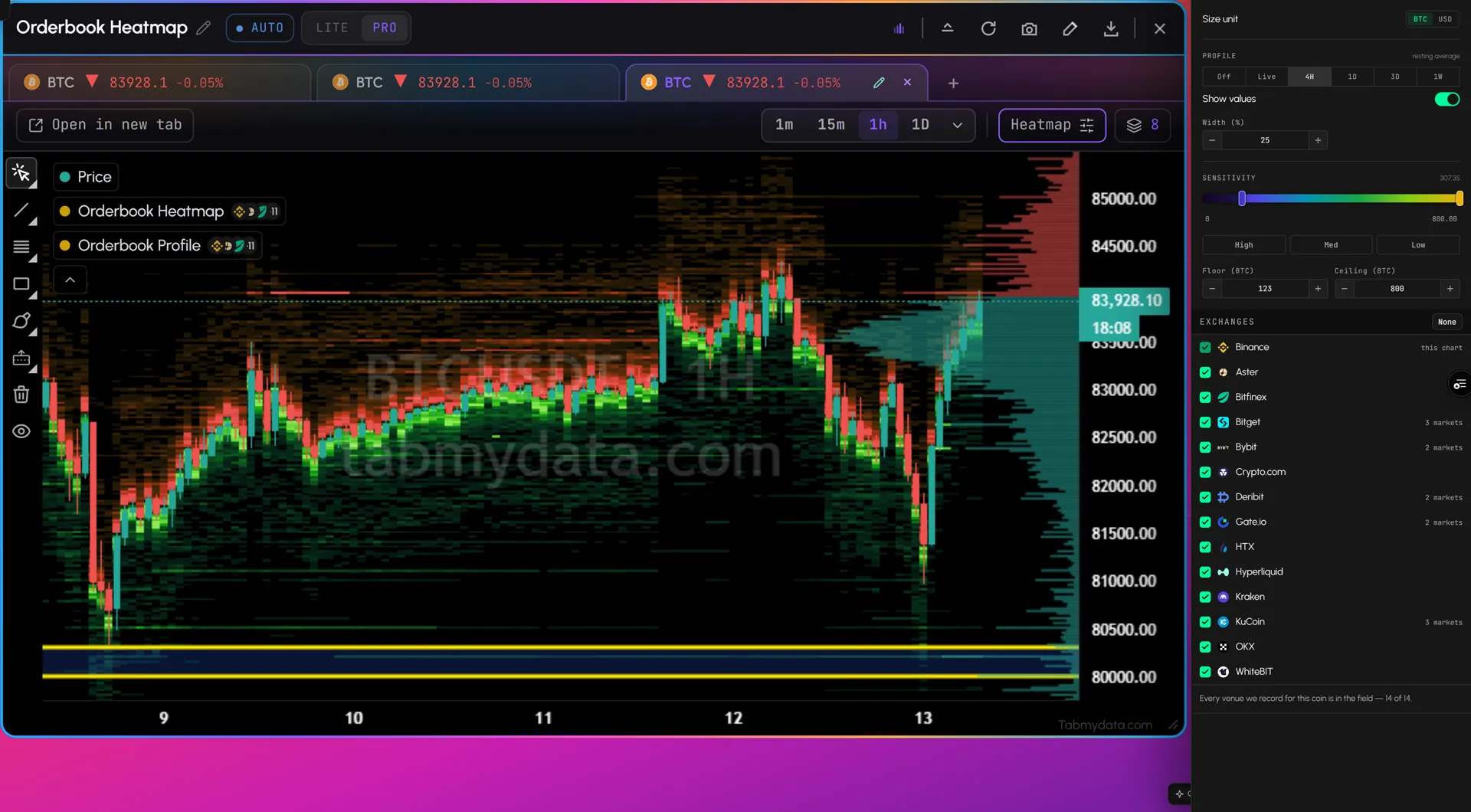
Horizontal bars on the right edge show resting size at each price level, for the live book or summed over 4H, 1D, 3D or 1W. Show values in the coin or in USD.
- 05
Choose your lens
Set the size unit, the Orderbook Profile and the sensitivity in a few clicks to fit your analysis, and choose any exchange or instrument you want. Press Heatmap in the tab to open the settings. Sensitivity has High, Med and Low presets, or set your own floor and ceiling. A quiet coin and a busy one are both readable.
- 06
Every order at one price
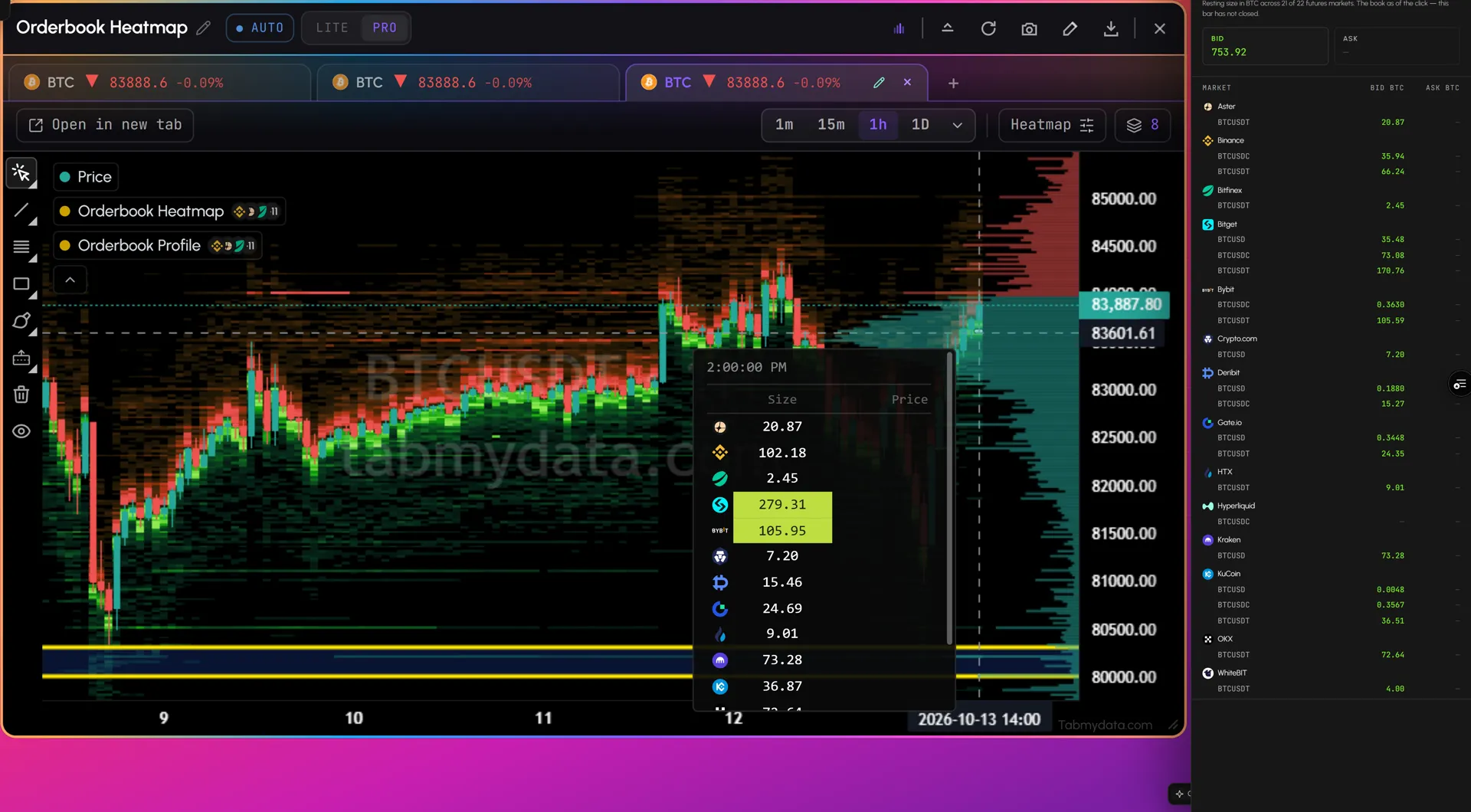
See each exchange's size at each price in one click. Click a heat cell and a side panel shows the resting size at that price for each exchange and market, bids and asks side by side.
- 07
All your instruments on one tab
Open another instrument with "+" next to the first. Each keeps its own asset tab inside the same Orderbook Heatmap.
- 08
Stocks, ETFs and gold
The same heatmap on BTC and ETH, and on tokenized stocks and ETFs such as NVDA and SPY, and on gold (XAU). The full list is on the tokenized stocks page, and gold has its own page: gold liquidity heatmap.
Show all features (9)
- 09
Draw on the plot
Trend Line, Fib Retracement, Rectangle, Brush and more: pick any drawing tool and save your drawing on any symbol. The bar also has Clear All and a View/Hide option. For indicators under the candles, open a Charts tab.
Use cases
How traders use it
- 01
Before a session
Open BTC, scroll back a week and see which levels kept size and which cleared.
- 02
Around a release
Check where liquidity sat in the hours before a CPI print or rate decision, then watch how it changed after.
- 03
Capital markets
The same read on SPY or gold, with market hours and the calendar in the same workspace.
What's in the tab today
- A heat field behind the candles. Resting depth over time, and an Orderbook Profile band on the right edge.
- Time frames. 1m, 15m, 1h and 1D are one click away. More time frames sit in a menu.
- All your assets in one tab. Asset tabs run along the top. Press "+" to add another, or open one as its own tab.
- An asset picker with three groups. Crypto, Stocks and ETFs, and Commodities. Search the recorded futures instruments and see the exchanges behind each one.
- Field settings. One panel for the tooltip, the size unit, the Orderbook Profile, sensitivity and the exchanges that feed the picture.
- A layers legend. Price, the Orderbook Heatmap and the Orderbook Profile, each with an eye to hide it and a gear to open its settings.
- Drawing tools. Cursor, Trend Line, Fib Retracement, Rectangle and Brush, with a Drawings library saved per symbol.
Who it's for
- Crypto and derivatives traders who want to see where order-book liquidity sat across exchanges before and during a move.
- Capital-markets traders who want the same read on tokenized stocks, ETFs and gold, next to market hours and the economic calendar.
- Newer traders who are learning to read liquidity and want one calm tab to practise on.
How to use it
- Open the Orderbook Heatmap tab and press the pencil on the asset tab to pick an instrument from the recorded assets.
- Pick a time frame: 1m, 15m, 1h or 1D.
- Open Field settings (the Heatmap button) and tick the exchanges that feed the picture.
- Set the sensitivity with a preset (High, Med or Low) or your own floor and ceiling.
- Check size with colour. Brighter colour means bigger size at that price.
- Check the time frame. How long did a band last, and was it still there when price arrived? Candles run through the heatmap, so you see both together.
- Turn on the Orderbook Profile to see resting size by price level. Pick Live, 4H, 1D, 3D or 1W.
- Scroll back through months of history to see how liquidity built up or cleared in earlier sessions.
- Compare with the live multi-exchange order book for depth right now, or the liquidation heatmap for modeled liquidation levels.
It describes where liquidity sat, not where price will go.
Related tools
- Multi-exchange order book: live depth on any listed coin.
- Liquidation heatmap: modeled liquidation levels, its own tab and a layer in Charts.
- Charts: candles with live liquidations.
- Tokenized stocks, ETFs and gold and gold liquidity heatmap: what the heatmap covers outside crypto.
- Economic calendar and market hours: context for stocks, gold and macro releases.
- Learn: liquidity heatmap vs liquidation heatmap. Help: Orderbook Profile.
FAQ
Orderbook Heatmap FAQ
What is a liquidity heatmap?
A chart that shows resting order-book liquidity as colour over time. Price runs along one axis and time along the other. Bright bands are large resting size at a price; faint areas are thin. The Orderbook Heatmap merges depth from the exchanges you choose and puts candles on top.
How do you read a liquidity heatmap?
Look at colour first: brighter means more size sat at that price. Then look at time: how long a band lasted and whether it was still there when price arrived. Candles run through the heatmap so you see both together. It describes where liquidity sat, not where price will go.
Can you see historical order book liquidity, and how far back does it go?
Yes, on 93 instruments: 43 crypto, 44 stocks, ETFs and tokens, and 6 commodities, including gold. Scroll back through months of history to see how liquidity built up or cleared. History is recorded continuously and keeps growing; how far back it goes depends on when each instrument's recording began. The full list is on the tokenized stocks page.
Is there a liquidity heatmap for gold and stocks?
Yes. The same heatmap covers gold (XAU), silver and energy commodities, tokenized stocks such as NVDA and ETFs such as SPY, with months of history. See the gold liquidity heatmap.
What's the difference between a liquidity heatmap and a liquidation heatmap?
A liquidity heatmap shows resting orders that sat in the order book. A liquidation heatmap shows modeled levels where leveraged positions could be liquidated, not real orders. The Liquidation Heatmap is its own tab, and you can also add it as a layer in Charts. More in liquidity heatmap vs liquidation heatmap.
Is there a free order book heatmap for crypto?
Yes. Tabmydata's Orderbook Heatmap is free during Alpha. No card needed.
Free during Alpha. Shows where liquidity sat, not a forecast.
Tabmydata's Orderbook Heatmap turns resting order-book liquidity from the futures exchanges you pick into colour behind your candles, with months of history you can scroll back on 93 instruments, from BTC to tokenized stocks and gold. See each exchange's size at each price in one click. Free during Alpha.
Sign up free