Workspaces & Tabs
How to add liquidations to a chart
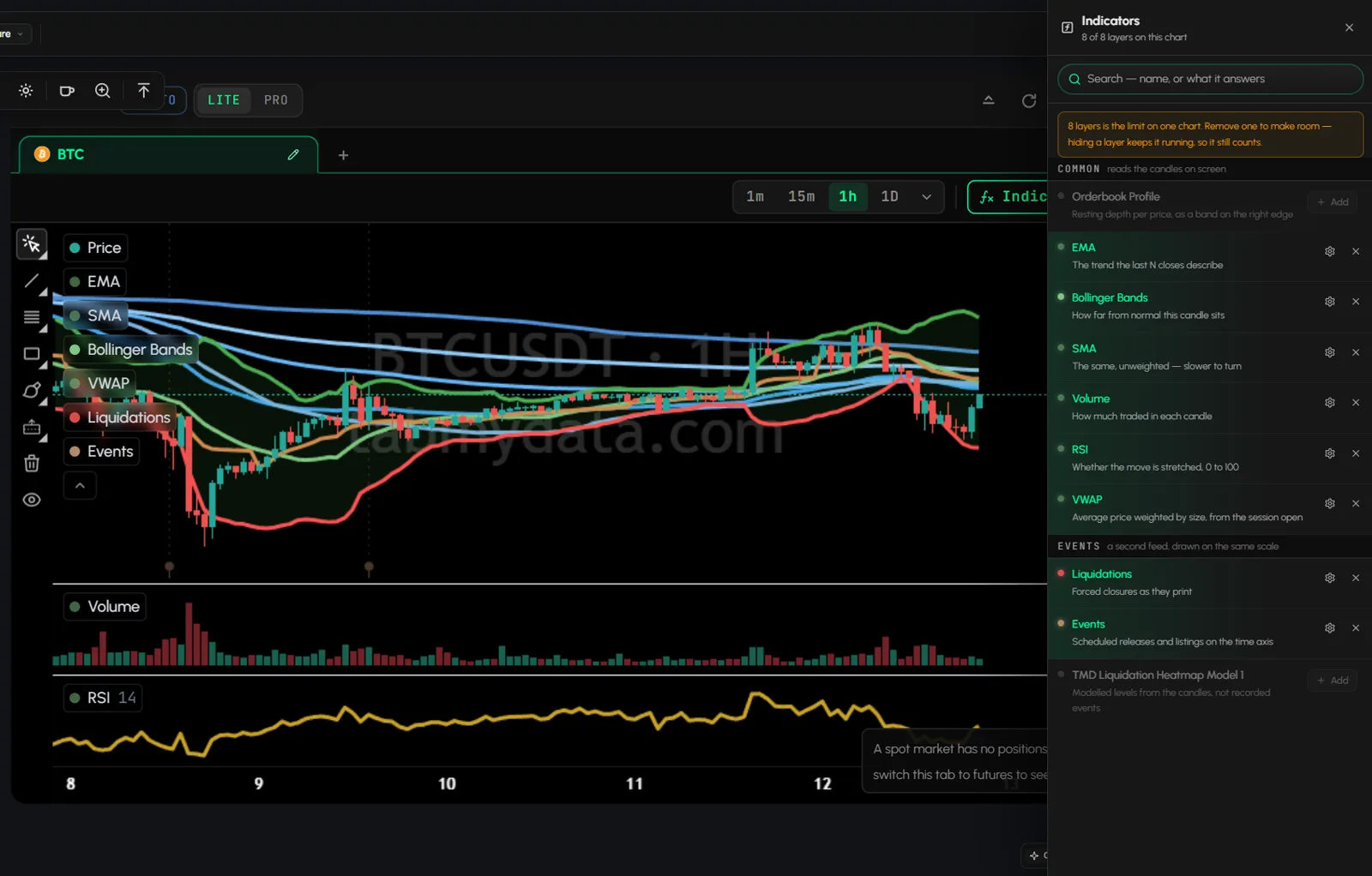
Open a coin in the Chart tab to see liquidations on price, and add indicators such as EMA and Bollinger Bands. You can stack up to 8 layers on one chart, from EMA and Bollinger Bands to forced liquidations and scheduled events. A new tab opens with the price only, and your set is saved per tab.
On this page
- What you can do
- How to add the Chart tab
- How to change the asset
- How to keep many assets in one tab
- How to change the time frame
- How do I add an indicator to the chart?
- The indicator library
- How to change a layer's settings
- How to hide or remove a layer from the legend
- The 8 layer limit
- How do I see liquidations on a crypto chart?
- How do I draw on the chart?
- How to read the crosshair
- How to zoom the time axis
- Tab controls
- Settings
- States
- Frequently asked questions
- Related
Product overview: custom charting indicators.
What you can do
- Pick any asset and switch time frames.
- Add up to 8 indicator layers from a library.
- Tune each layer's colours and lengths, hide it or remove it.
- Overlay Orderbook Profile, liquidations, scheduled events and the modeled Liquidation Heatmap.
- Draw on the chart with the left rail.
- Read price and time at the crosshair.
- Keep many assets as chart tabs inside one Charts tab.
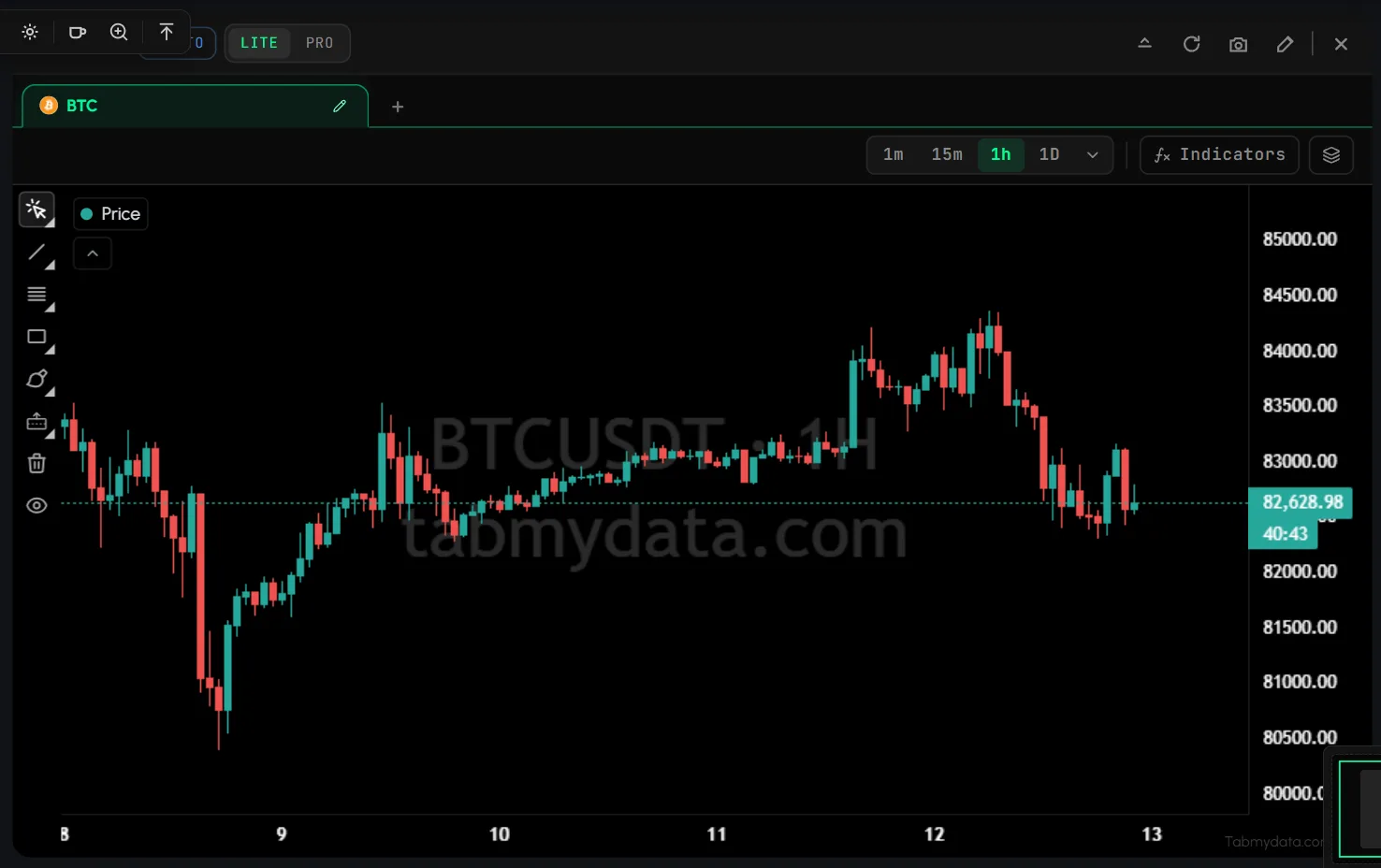
How to add the Chart tab
- Click + (Add a tab), or press T.
- Under Charts and analysis, click Charts (badge LIVE), or press Shift + 6.
- Hover it for the presets: BTC chart, ETH chart, BNB chart and Binance spot 1h. Click one to open a coin already set up.
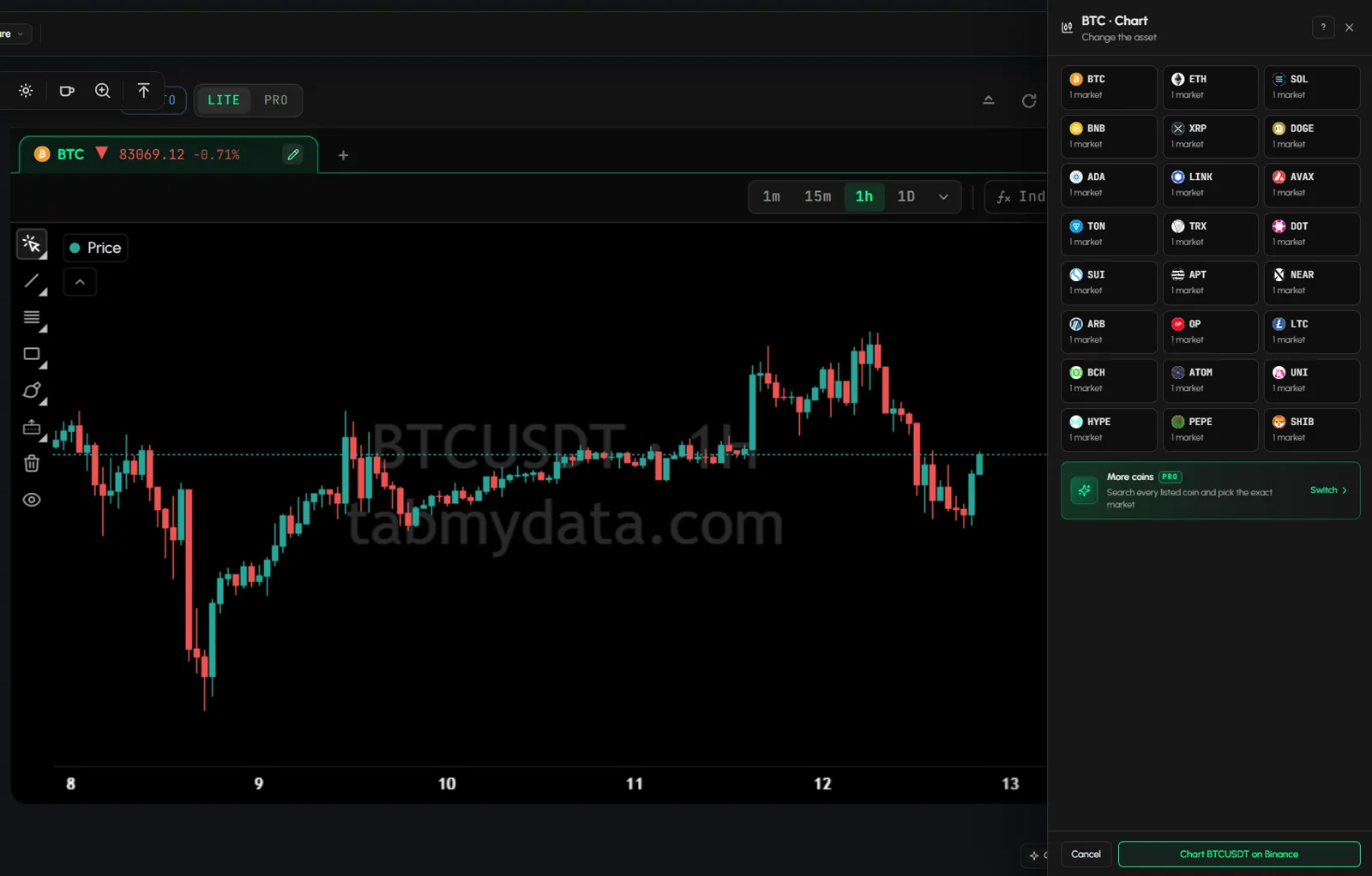
How to change the asset
- Click the pencil next to the asset name in the tab.
- The Change the asset panel opens. Search a coin or pair, switch between spot and futures, and pick the market. Tokenised stocks, ETFs, gold and commodities that trade on crypto exchanges are in the same search.
- The header shows the price and move, for example "BTC ▲ 83415.01 +0.28%". Hover it: "BTC · 1h · Binance spot".
How to keep many assets in one tab
Inside the tab you can:
- Click + to add another chart tab.
- Click x on a chart tab to close it.
- Use Open in new tab to move it to its own Charts tab.
- Use New chart tab ("New tab with this setup") to copy the current setup.
How to change the time frame
- Click one of the chips: 1m, 15m, 1h or 1D.
- For others, click More time frames: 1m, 3m, 5m, 15m, 30m, 1h, 2h and more.
Each chart tab inside the Charts tab keeps its own time frame.
How do I add an indicator to the chart?
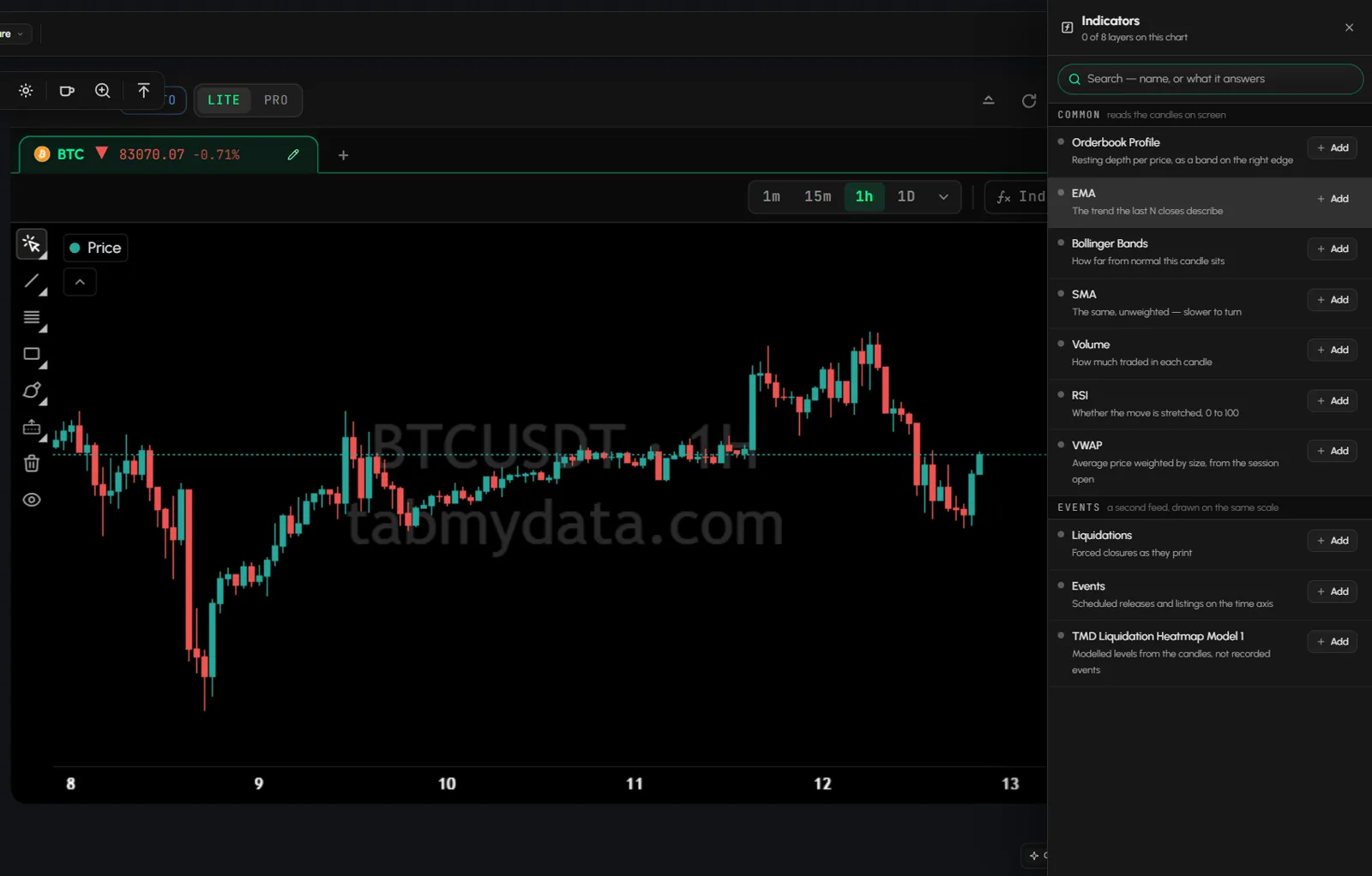
- Click Indicators (tooltip: "the library, in the side panel"). A side panel opens: "Indicators · N of 8 layers on this chart".
- Scroll the list. It has two groups, COMMON and EVENTS. The panel has no search box.
- Click Add next to a layer. It appears on the chart and in the legend row. The panel stays open, so you can add many layers one after another.
- Close the panel when you are done.
Tip: Volume and RSI sit in their own panes under the price. The other layers draw on the price scale.
The indicator library
COMMON (reads the candles on screen)
| Layer | What it answers | Settings |
|---|---|---|
| Orderbook Profile | Resting depth by price, as a bar on the right edge | Reading: Live, 4H, 1D, 3D, 1W. Show values. Size unit BTC or USD. Width %. EXCHANGES checklist |
| EMA | The trend of the last N closes | Fast, Medium, Slow colours and lengths (50, 100, 200 by default) |
| Bollinger Bands | How far the candle is from normal | Colours: Basis, Positive, Negative, Lower, Higher. Mult, Length, Line Style |
| SMA | The same, not weighted | Fast and Slow colours and lengths |
| Volume | How much traded in each candle | Up and Down colours. Sits in its own pane under price |
| RSI | Whether a move is stretched, 0 to 100 | Colour, Length (14). Sits in its own pane |
| VWAP | Volume-weighted price from the session open | Colour |
EVENTS (a second feed, drawn on the same scale)
| Layer | What it shows | Settings |
|---|---|---|
| Liquidations | A triangle per forced closure over $10k ("Forced closures as they print") | EXCHANGES, MINIMUM SIZE (Any, $10k, $50k, $100k, $1M, $ or BTC) |
| Events | Scheduled releases and listings on the time axis | Minimum impact High, Medium or Low. On the plot: Past, Next up, Ahead. Source: the Calendar tab, by the market's currency |
| TMD Liquidation Heatmap Model 1 | Modeled levels from the candles, not recorded events | Colors 1 to 5 (weak to strong). Parameters: Leverage Buffer, Threshold, Fade Amount, Max Distance, Fade Start |
For Orderbook Profile see Orderbook Profile. Indicators describe what the candles and books show. They are not signals, and nothing here is financial advice.
What is the Liquidation Heatmap layer?
The TMD Liquidation Heatmap Model 1 layer draws modeled liquidation levels from the candles on screen, not recorded events. Its settings have colours 1 to 5 (weak to strong) and parameters such as Leverage Buffer, Threshold, Fade Amount, Max Distance and Fade Start, plus Origin Mode and Theme choices. The Liquidation Heatmap is also a tab of its own: see Liquidation Heatmap. It is separate from the Orderbook Heatmap, which is a different tab with a different data source.
How to change a layer's settings
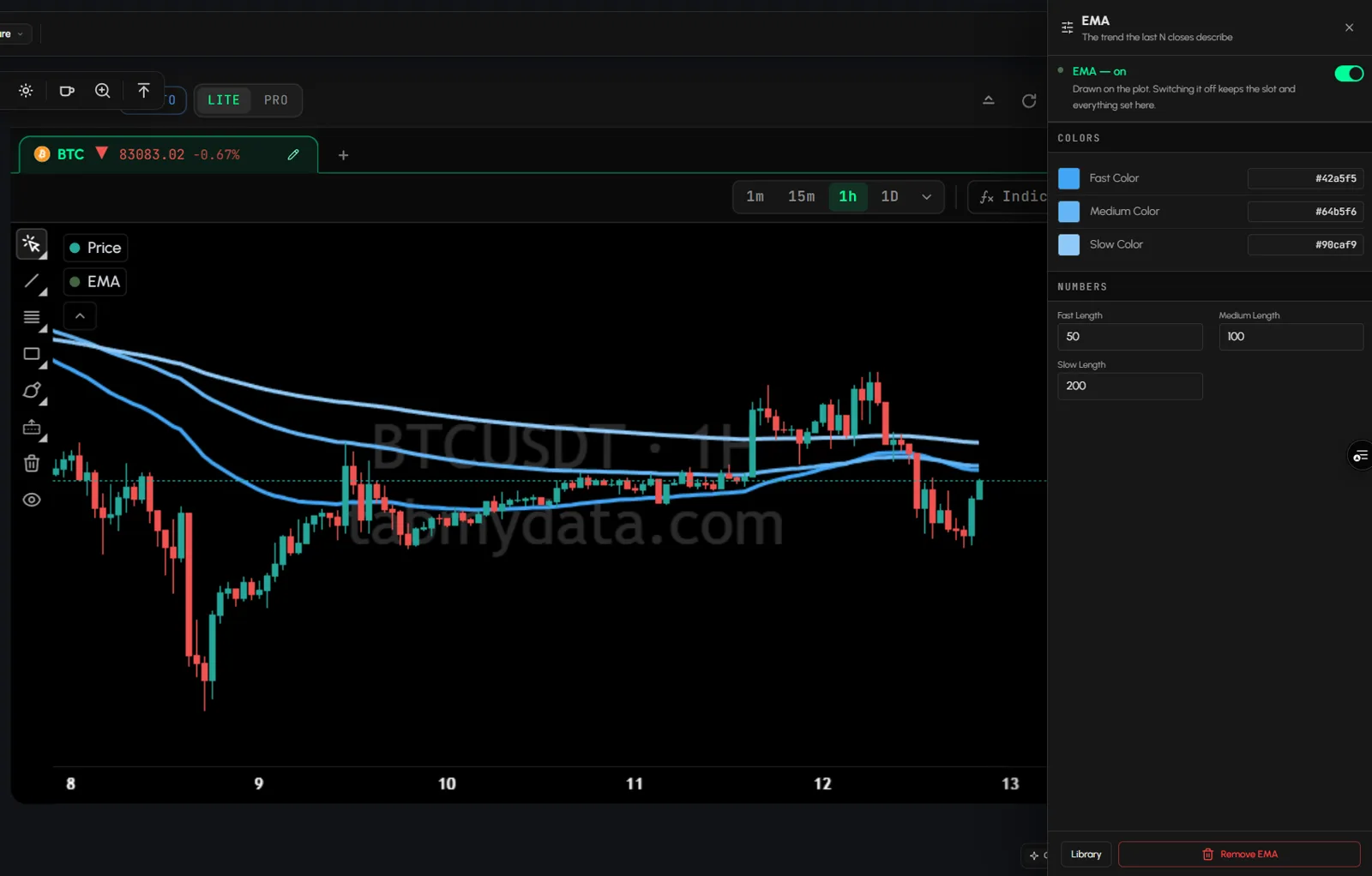
- Click the gear on the layer's legend row, or the gear in the library.
- Change colours (hex field or picker), lengths and other values.
- Use the on/off switch to switch the layer off. "Switching it off keeps the slot and everything set here."
- Click Remove to delete it, or the back button to return to the library.
Settings save on their own: a layer has no Save button. Careful: the red Remove button deletes the layer. To pause a layer, use the on/off switch or the eye on the legend row. If you add a layer of the same type again, it keeps the settings you last gave that type, for example the exchanges you ticked on Liquidations.
How to hide or remove a layer from the legend
- Hover the legend row.
- Click the eye to hide, the gear for settings, or x to remove.
The 8 layer limit
A chart takes 8 layers. "8 layers is the limit on one chart. Remove one to make room. Hiding a layer keeps it running, so it still counts." At the limit, the Add buttons are disabled with "At the layer limit, remove one first".
How do I see liquidations on a crypto chart?
- Switch the chart to a futures market.
- Click Indicators and add the Liquidations layer.
- In its settings, tick the exchanges (the list has nine, plus All) and set MINIMUM SIZE (Any, $10k, $50k, $100k or $1M). A new layer starts at $10k. A cascade usually prints on many exchanges at once, so tick more than one.
- Click a purple triangle. A side panel, What you clicked, shows the forced closure with its price, size, dollar value and venue.
A higher minimum size leaves fewer triangles, so raise it on a busy chart. On a spot market the layer says: "A spot market has no positions to force closed, switch this tab to futures to see liquidations."
How do I draw on the chart?
The left rail has Cursor, Trend Line, Fib Retracement, Rectangle, Brush, Long Position, Clear All and Hide drawings, plus a Drawings library. Zoom, scroll and reset buttons sit on the chart.
Your drawings are saved in your drawings library, per symbol. The library shows where it is saving, for example "Saving to Default on BTCUSDT", with a count and when it was last edited. It has New drawing and Import. A new Charts tab on the same symbol loads the drawings you saved.
- Open the Drawings library and click New drawing. It creates a record, for example "BTCUSDT Drawing 2", and makes it the active one.
- Pick a tool on the left rail and draw.
- Clear All empties only the active record. Deleting a record from its row menu asks for no confirmation.
To export all your drawings as a file, see Keep your account secure.
How to read the crosshair
Hover the chart. A tag shows the date, time and price at the pointer.
How to zoom the time axis
Roll the mouse wheel over the chart to zoom the time axis. The canvas does not zoom when you do this. The bar at the bottom of the chart also has zoom in, zoom out and Reset View. The zoom is not kept after you reload the page.
Tab controls
The header has LITE | PRO, Minimize, Refresh, Screenshot, Edit appearance and Close. See Tab controls.
Settings
| Setting | Options | Scope |
|---|---|---|
| Asset | Change the asset panel | Per chart tab |
| Time frame | 1m to 1D and more | Per chart tab |
| Indicator set | Up to 8 layers | Per tab, not per account |
| Layer settings | Colours, lengths, units | Per layer |
| Drawings | Saved in your drawings library | Per symbol, per account |
| Edit appearance | Tab Color, Tab Skin, Font | This tab |
States
- New tab: price only, 0 layers.
- At the limit: Add buttons disabled.
- Spot with Liquidations: a message to switch to futures.
Frequently asked questions
How do I add indicators to a crypto chart?
Click Indicators, then Add next to the layer.
How many indicators can I add?
8 layers per chart. Hidden layers still count.
Is my indicator set saved?
Yes, per tab. Every Charts tab keeps its own set.
Can I see liquidations on the chart?
Yes, on a futures market. Add the Liquidations layer.
What is the Liquidation Heatmap layer?
Modeled levels computed from the candles. They are not recorded events and not a forecast. It is also its own tab, and it is separate from the Orderbook Heatmap.
Can I add a stock or a commodity?
Yes. In the Change the asset panel, search a stock, ETF, gold or an oil pair that trades on a crypto exchange.
Which indicators are included?
Orderbook Profile, EMA, Bollinger Bands, SMA, Volume, RSI, VWAP, Liquidations, Events and the TMD Liquidation Heatmap Model 1.
Can I save drawings?
Yes. They are saved in your drawings library, per symbol. A new Charts tab on the same symbol loads them.