Workspaces & Tabs
How to track live liquidations in the Liquidations tab
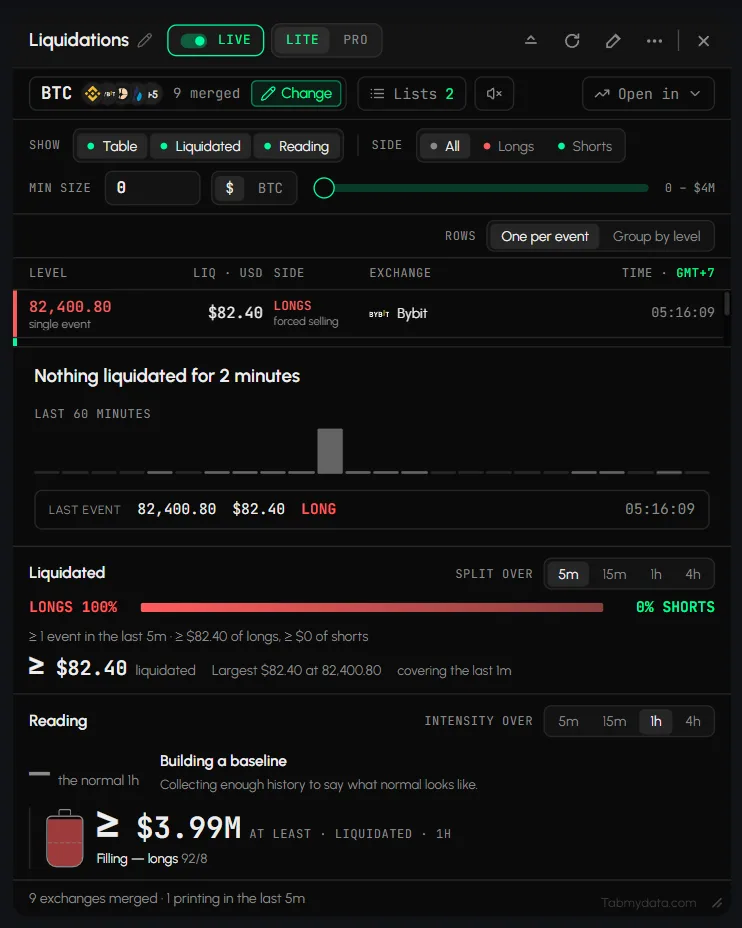
To track crypto liquidations live in Tabmydata, open the Liquidations tab and pick a coin. It lists forced closes of leveraged futures positions as they hit, sized and sided, merged from the exchanges you choose. Totals and a comparison with a normal level sit above the list. It describes what already happened. It does not predict what comes next.
On this page
- What you can do
- How do I add the Liquidations tab?
- How do I choose the coin and the exchanges?
- How do I choose what the tab shows?
- How do I show only longs or shorts?
- How do I filter liquidations by size?
- How do I cluster liquidations by price?
- How do I read the table?
- How do I read the Liquidated block?
- How do I read the Reading block?
- What does the tab show when nothing is liquidated?
- Does the Liquidations tab have a sound?
- How do I load a saved list, open elsewhere, pause or refresh?
- Settings
- States
- Frequently asked questions
- Related
A liquidation is a leveraged position the exchange closed because margin ran out. This tab is futures only.
Product overview: crypto liquidation tracker.
What you can do
- Merge futures markets from many exchanges into one feed.
- Show the table, the totals, the intensity reading, or any mix.
- Filter by side (longs or shorts) and by minimum size.
- List every event on its own line, or cluster nearby events.
- Read long/short totals over 5m, 15m, 1h or 4h.
- Compare the flow with a normal level.
- Play a sound on very large liquidations.
How do I add the Liquidations tab?
- Click + (Add a tab), or press T.
- Under Orderbook and flow, click Liquidations, or press Shift + 3.
- Hover it for the presets: BTC liquidations (16 venues), ETH liquidations (16) and BNB liquidations (15).
- Without a preset the tab opens empty. Click Pick a symbol.
How do I choose the coin and the exchanges?
- Click Change. The panel is titled "Choose the futures markets merged into this tape" and notes: "Futures only. Spot markets have no liquidations. Hyperliquid is not listed; it does not publish them."
- Pick a coin from the 24-coin grid. A tile shows its futures market count (BTC showed 14 markets in this tab).
- Use the exchange chips to narrow the list, and Clear all to reset them.
- Click Review N markets, remove any with x, then click Read BTC on N markets.
- The header shows the merge, for example "BTC · +5 · 9 merged". Hover it for "BTC · 14 feeds across 9 exchanges".
- A dialog asks Keep this selection as a list? Click Save and apply, Not now or Cancel.
For a coin outside the grid, use More coins (PRO). See How to choose coins and exchanges in a tab.
How do I choose what the tab shows?
- Find SHOW. It has three toggles: Table, Liquidated and Reading. All three are on by default.
- Turn each on or off. The three work independently.
- Turning Table off hides the event list, its column header and the ROWS control. The totals and the reading stay.
- Turning Reading off (or Liquidated off) gives the table more room, so more rows are visible.
Your choice stays after you reload the page.
How do I show only longs or shorts?
Use SIDE: All, Longs or Shorts. A long liquidation is forced selling and shows in red. A short liquidation is forced buying and shows in green. Rows read "LONGS forced selling" and "SHORTS forced buying".
How do I filter liquidations by size?
- Find MIN SIZE.
- Type a value and press Enter, or drag the slider. The slider has 13 steps from 0 to $4M: 0, $100, $1K, $5K, $10K, $25K, $50K, $100K, $250K, $500K, $1M, $2M and $4M. A typed value moves the slider to a step.
- Type 0 to reset the filter.
- Click $ | BTC to change the unit. The LIQ column, the totals and the reading switch with it. Before a coin is picked it reads QUOTE | BASE.
Tip: big liquidations are rare. At high steps the list can be short or empty, so lower MIN SIZE if you see nothing. Your value stays after you reload the page.
How do I cluster liquidations by price?
Use ROWS, in its own row under the controls:
- One per event lists every forced close on its own line.
- Group by level merges events within 0.06% of each other in price and within 45 seconds into one line. A cluster row shows a price range, for example "82,796-82,838", then "3 events clustered", the size, the side and the number of venues.
How do I read the table?
| Column | What it shows |
|---|---|
| LEVEL | The price, and "single event" or a cluster count |
| LIQ · USD | The size |
| SIDE | LONGS ("forced selling", red) or SHORTS ("forced buying", green) |
| EXCHANGE | Logo and tags such as "dust", "large", "very large" or "whale" |
| TIME | In your time zone |
Newest is on top. Clicking a row does nothing.
How do I read the Liquidated block?
- Pick a window: 5m, 15m, 1h or 4h (SPLIT OVER). Each window has its own counts, and your choice stays after a reload.
- The block shows the long/short split as a bar, for example "LONGS 100%" and "0% SHORTS", then the event count with the long and short amounts, and a total with the label "liquidated".
- Totals can carry a ≥ sign, for example "≥ $166.37 liquidated". The sign means these are a floor, not a total.
- It also shows the largest event, for example "Largest $83.39 at 83,385.70", and a comparison such as "<0.1× a normal 5m, quiet".
After a page reload the counts say the history was cut off. Treat them as a floor.
How do I read the Reading block?
- Pick a window in INTENSITY OVER: 5m, 15m, 1h or 4h. The default is 1h.
- The block compares the flow with its normal level, for example "0.3x the normal 1h". A short verdict says what that means, for example "Leverage is holding, nothing forced out".
- Below it you find the total liquidated, the direction (for example "Emptying, shorts 35/65"), WHERE (the price with the biggest share), HELD? (the size against resting depth), SPREAD (how many venues are liquidating) and SOURCES (the share sampled).
- New tabs first say "Building a baseline. Collecting enough history to say what normal looks like." Then the reading fills.
This describes intensity. It is not a forecast.
What does the tab show when nothing is liquidated?
When nothing was liquidated for a while, the table reads "Nothing liquidated for 2 minutes". It adds a 60-minute sparkline and a LAST EVENT line with price, size, side and time. The footer reads, for example, "9 exchanges merged · 4 printing in the last 5m".
Does the Liquidations tab have a sound?
Yes. The Liquidations tab has a speaker button in the controls row. Its tooltip reads "Play a sound on very large and whale liquidations".
- Click the speaker button to switch the sound on.
- Click it again to mute.
The sound is a setting of this tab. The Trades tab has the same kind of button for large prints: see How to use the Trades tab.
How do I load a saved list, open elsewhere, pause or refresh?
- Lists loads a saved selection in one press. The panel is titled "Load a tape you have already built" and shows only the lists you saved yourself. See saved lists.
- Open in sends the same coin to another tab: Charts (Binance liquidations), Orderbook, Orderbook Heatmap or Live Trades. See open in another tab.
- The green dot pauses the feed.
- The circular arrow refreshes it. Refresh clears the table and restarts the tape, so rows refill from the live stream only. The Liquidated and Reading numbers keep their values.
More: Tab controls.
Settings
| Setting | Options | Scope |
|---|---|---|
| SHOW | Table, Liquidated, Reading | This tab |
| SIDE | All, Longs, Shorts | This tab |
| MIN SIZE | Typed value or 13-step slider, $ or BTC | This tab |
| ROWS | One per event, Group by level | This tab |
| Windows | 5m, 15m, 1h, 4h | This tab |
| Sound | On or muted | This tab |
| Display density | LITE or PRO | Every Liquidations tab |
States
- Loading: while the tab's data loads, it shows the letter T (the Tabmydata logo) bouncing slowly in a loop, like a ball, until the data arrives. After you apply a coin and its markets, the table first fills with recent history and then follows the live feed.
- Paused: the chip reads PAUSED and the tape stops until you click it again.
- Empty: "Nothing on the tape. Choose a coin and its futures markets, and every forced exit lands here, newest on top." with Pick a symbol. Liquidated reads "Pick a symbol to see what was forced out." Reading reads "Pick a symbol to read the forced flow against its normal."
- Quiet: when a coin has had no events for a while, the table reads "Nothing liquidated for 2 minutes". The Liquidated block can read "<0.1× a normal 5m, quiet".
- Baseline: "Building a baseline".
- After a reload or Refresh: the table starts empty and refills from the live stream. The totals keep their backfilled numbers.
- Data not loading: see Data not loading.
Frequently asked questions
What is a liquidation?
A leveraged position closed by the exchange because its margin ran out.
What is the difference between long and short liquidations?
A long liquidation is forced selling and shows in red. A short liquidation is forced buying and shows in green.
Why is Hyperliquid not in the list?
It does not publish liquidations. The panel says so.
Why is there no spot market?
Spot markets have no liquidations. The tab is futures only.
What do Table, Liquidated and Reading show?
Table lists events. Liquidated adds up longs and shorts. Reading compares the flow with its normal level.
What does "a floor, not a total" mean?
The numbers count the events the tab has received. After a reload the earlier history is cut off, so the figure can only be higher, which is why it carries the ≥ sign.
What does Group by level do?
It merges events within 0.06% and 45 seconds into one line, so you can see clusters by price.
Does it show where liquidations will happen?
No. This feed shows forced closes as they hit. For modeled levels, see the Liquidation Heatmap. It is not a forecast or financial advice.
Can I filter out small liquidations?
Yes. Set MIN SIZE, or type 0 to show everything again.