Account & Settings
How to edit your profile and avatar
To change your Tabmydata profile picture, open Profile Settings from your avatar, go to the Profile section and click the avatar. Pick a preset or upload your own image. The same page holds your nickname, name, bio, up to four social links and the switches that choose what other members see.
On this page
What you can do
- Change your avatar.
- Set your nickname, name, date of birth, bio, language, country and city.
- Add up to 4 social links, and hide any of them.
- Choose which details are visible on your public profile.
- Copy your User ID.
How do I open my profile settings?
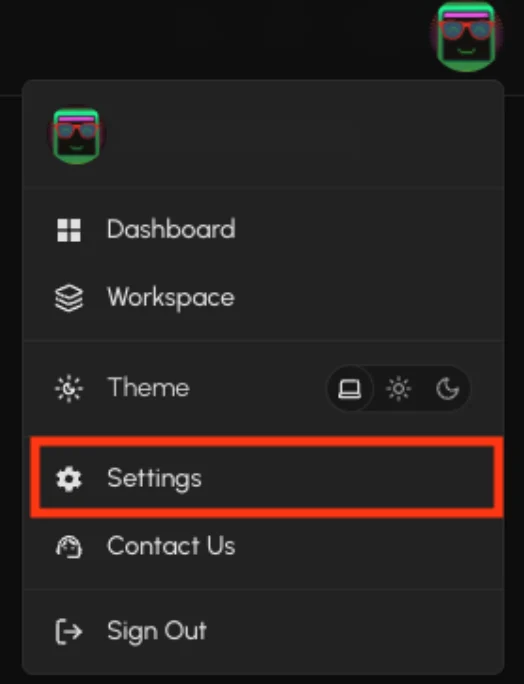
- Click your avatar in the top bar and choose Profile Settings. Or click Settings in the sidebar user menu, or the gear on the Dashboard.
- The Settings page opens on the Profile section. The sections are Profile, Social, Account and Notifications. On a phone, the sections show as a dropdown.
How do I change my profile picture?
- In Profile, find the avatar at the top and click to change it.
- The Choose your profile picker opens. Pick a preset, or click Upload to use your own image.
- Presets are grouped as All, TMD Mascot, Monster, Pet, People and Cute. The first tile clears your avatar.
Tip: choose a picture you are happy for other members to see. Your avatar shows on your public profile.
How do I change my nickname and details?
| Field | Notes |
|---|---|
| Nickname | Up to 30 characters. Shown as @nickname. |
| User ID | Read only. Click the copy icon to copy it. |
| First name, Last name | Up to 50 characters each. |
| Date of Birth | Pick it with the date picker. |
| Bio | Up to 128 characters. |
| Language, Country, City | Pick or type your own. |
Save your changes when you are done.
How do I add social links?
- Under Social Links, you have 4 slots. Fill the title and the URL of each.
- Click the eye next to a link to hide it from your public profile.
How do I choose what other members can see?
Under Profile Visibility, switch each one on or off: Full name, Date of birth, User ID, Language, Country and City. A hidden detail shows a "(Hidden)" flag on your own profile. See Your public profile.

Frequently asked questions
Can I use my own picture as an avatar?
Yes. Click Upload in the avatar picker, or pick one of the presets.
How do I change my username on Tabmydata?
Edit Nickname in the Profile section. It is shown as @nickname and can be up to 30 characters.
Who sees my profile?
Other members see the details you leave visible in Profile Visibility. To stop new friend requests, see Social settings.
Where do I change my password or email?
In Settings, Account. See Keep your account secure.
Can I change my User ID?
No. It is read only.