Workspaces & Tabs
How to use the economic calendar in the Calendar tab
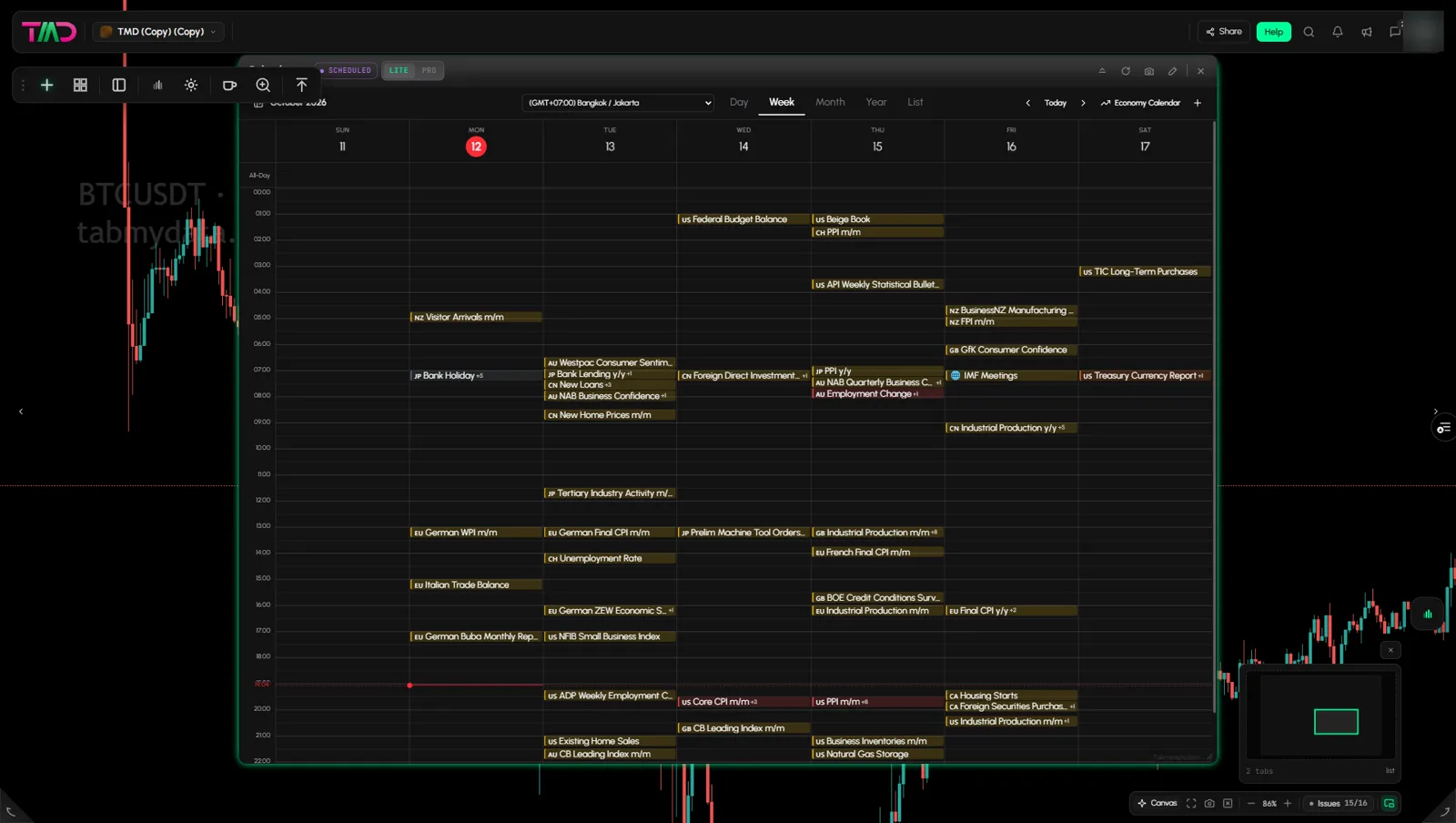
The Calendar tab is the economic calendar for crypto traders: scheduled releases in your time zone, with impact, forecast and actual figures. Filter by impact and currency, and add your own events to the same grid. A red line marks the current time.
On this page
Product overview: financial calendar.
What you can do
- Switch between Day, Week, Month, Year and List views.
- Set the time zone the grid uses.
- Open an event for its details.
- Filter by impact and by currency.
- Add your own events to Personal, Work or Other calendars.
How to add the Calendar
- Click + (Add a tab) on the tool rail.
- Open News and events and click Calendar (shortcut Alt+5).
How to change the view and move in time
- Click Day, Week, Month, Year or List. Day shows a red line at the current time. Month shows event chips. Year shows month tiles without chips. List is the "Upcoming" list from today, with a flag, title and time per event. Week is the default, and your view stays after you reload.
- Use the < and > arrows to move. Click Today to return to now.
- The title shows the period, for example "October 2026". A red marker shows today.
- A +N chip collapses a busy slot. Click it to see the rest.
What time is a release in my time zone?
- Open the time zone dropdown at the top. It offers 12 zones: UTC / London, Los Angeles, Chicago, New York / Toronto, Paris / Frankfurt, Israel / Cairo, Dubai, India, Bangkok / Jakarta, Singapore / Hong Kong / Kuala Lumpur / Beijing, Tokyo / Seoul, and Sydney / Melbourne.
- Pick yours. Times in the grid, in the event popup and in the New event form follow it.
The time zone is set per Calendar tab.
How do I read a release?
Click an event. If many events share a slot, the chip shows +N and a first popup lists them (for example "19:30, 3 events") with a flag, title and F / P / A figures per row. Click a row to open the event, and Back to return to the list. A popup shows the name, currency, impact (High, Medium or Low) and time. It also shows Forecast, Previous and Actual (a dash until the figure prints). Further down: Source, Measures, Usual Effect, Frequency, Next Release, notes and Why Traders Care. A last line gives the source and the update date.
How do I filter high-impact events?
- Open the filter sidebar with the panel icon at the left of the toolbar (it has no label). The sidebar is closed again after every page reload.
- Under Economic impact, switch High (red), Medium (orange), Low (yellow) and Holiday (grey) on or off. All four start on.
- Under Currency, click All or None, or pick from USD, EUR, GBP, JPY, AUD, CAD, CHF, NZD, CNY and GLB. None empties the grid.
- Your impact and currency choices stay after you reload.
- GLB (globe icon) is for global events not tied to one country, such as IMF meetings.
Tip: to see only the big releases, switch Medium and Low off and leave High on.
How to add your own event
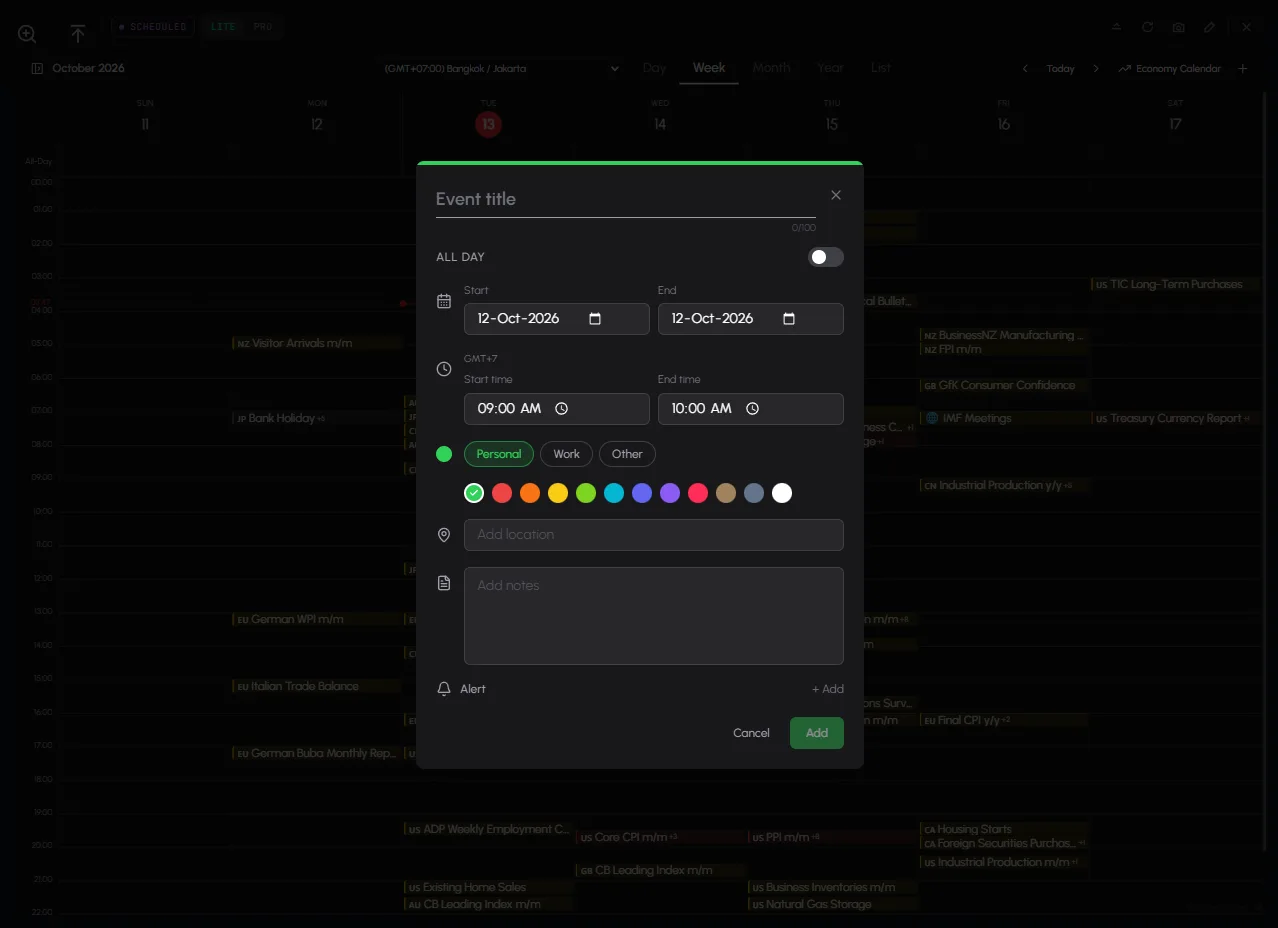
- Click + (New event) at the top right.
- Enter an Event title (up to 100 characters).
- Switch All day on, or set the start and end date and time. Times use the calendar's time zone.
- Pick Personal, Work or Other, and one of 14 colours.
- Add a location or notes if you want.
- Click Add.
Under My Calendars in the sidebar, switch Personal, Work and Other on or off.
The form also has a Cancel button if you change your mind. Press Escape to close any popup.
Tab controls
The header has the title (click to rename), a SCHEDULED badge, LITE | PRO, Ask Tami (PRO), Minimize, Refresh, Screenshot, Edit appearance, Share and Close. See Tab controls.
Settings
Time zone, view, impact and currency filters belong to the tab.
States
- Loading: while the tab's data loads, it shows the letter T (the Tabmydata logo) bouncing slowly in a loop, like a ball, until the data arrives.
- Empty and error states have not been seen.
Frequently asked questions
What time is a release in my time zone?
Pick your zone in the dropdown. Event times follow it.
Does it show forecast and actual figures?
Yes. The actual appears once the figure prints.
Can I add my own events?
Yes. Click +. Your events sit in the same grid.
Which currencies and impact levels can I filter?
Impact: High, Medium, Low and Holiday. Currency: USD, EUR, GBP, JPY, AUD, CAD, CHF, NZD, CNY and GLB for global events.
Is the economic calendar free?
Tabmydata is free during Alpha. The Calendar tab is part of it.
Does it say how price will react?
No. It shows what is scheduled and what was released.
Related
- Product overview: Financial calendar
- How to use the News tab
- How to use the Market Clock
- How to use the Chart tab (the Events layer shows these releases on a chart)
- Tab controls