Workspaces & Tabs
How to search and use keyboard shortcuts
In Tabmydata, click the magnifier in the top bar or press Ctrl/Cmd+K to search for a coin, a tab or a person. Press ? in a workspace to see every keyboard shortcut, which you can switch off one by one. Shortcuts such as T (add a tab) and L (arrange) make a workspace faster to run.
On this page
What you can do
- Search symbols, the tabs you can add, pages and your workspaces from one box.
- Add a tab from a search result.
- Jump to any open tab.
- See every keyboard shortcut and switch each one on or off.
How do I search from the top bar?
- Click the magnifier in the top bar, or press Ctrl/Cmd+K. The box is titled "Search Tabmydata".
- Type a coin (for example "ETH"), a tab name or a name.
- Use the filters under the box: All, Symbol, Tabs, People, Spaces. The number next to All is how many results are available right now.
- Pick a result. A tab result adds or opens that tab.
With the box empty, you see an Add a tab list with every tab, its name and a short description. The line under the box reads "Search covers symbols, the tabs you can add, the pages and your workspaces". The footer reads "Everything available right now" with the result count.
Search does not cover Help Center articles.
How do I jump to an open tab?
- In a workspace, click list under the minimap.
- Click a tab name. The canvas moves to it.
See Create a workspace.
How do I see the keyboard shortcuts?
- In a workspace, click Help in the top bar, or press ?.
- Choose Keyboard shortcuts.
- The panel lists 27 shortcuts, each with its key. Click a row to switch that shortcut off. The switch at the top turns them all off. Reset restores them. You can switch shortcuts off, but you can't set your own keys.
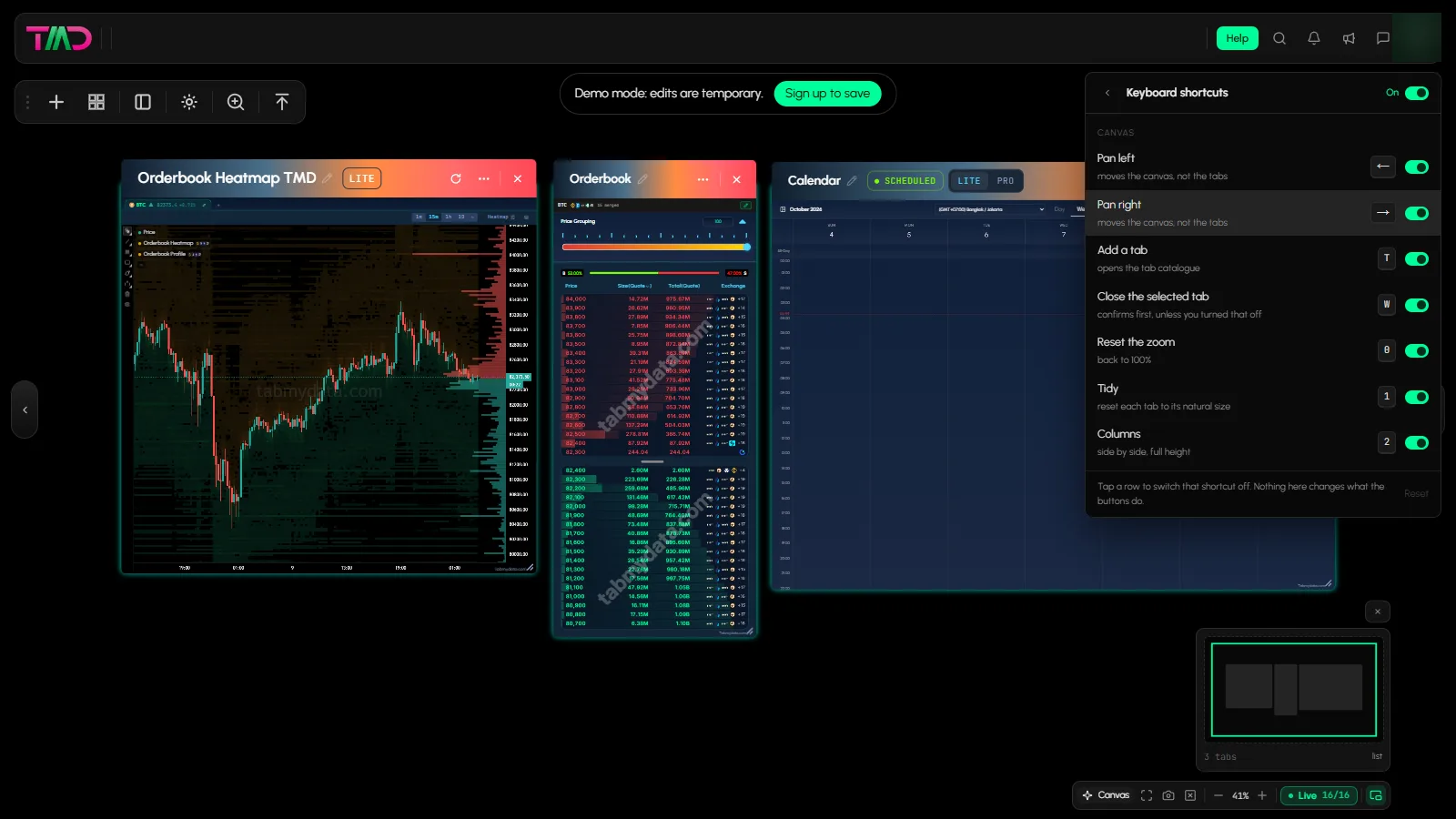
Which keyboard shortcuts does Tabmydata have?
| Key | What it does |
|---|---|
| Arrow keys | Pan the canvas (not the tabs) |
| Shift+arrow keys | Go to the previous or next workspace |
| T | Add a tab (opens the tab catalogue) |
| W | Close the selected tab (asks first, unless you turn the confirmation off) |
| 0 | Reset the zoom to 100% (the only zoom key) |
| 1 to 6 | Arrange the tabs: Tidy, Columns, Rows, Lead + strip, Two-up, Sidebar |
| L | Arrange (Layout menu) |
| , | Workspace settings |
| M | Magnifier |
| D | Back to the Dashboard |
| B | Take a break |
| A | Ask Tami |
| ? | Open the shortcuts list |
| Cmd+K | Search |
| Cmd+Shift+A | Alerts |
| Cmd+E | Edit appearance |
| F2 | Rename |
| Cmd+M | Minimise |
W closes the selected tab. It is not a canvas key. Keys 1 to 6 work without opening the Arrange menu. The panel labels the modifier key as Cmd.
Which keys add a tab?
Shift+1 to Shift+8 and Alt+1 to Alt+8 open tabs by number.
| Tab | Key |
|---|---|
| Orderbook | Shift+1 |
| Trades | Shift+2 |
| Liquidations | Shift+3 |
| Orderbook Heatmap | Shift+4 |
| Charts | Shift+6 |
| Heatmap | Shift+7 |
| Hyperliquid Whale Tracker | Shift+8 |
| Watchlist | Alt+1 |
| Coin Info | Alt+2 |
| Fear & Greed | Alt+3 |
| News | Alt+4 |
| Calendar | Alt+5 |
| Market Clock | Alt+6 |
| YouTube | Alt+7 |
| Alerts | Alt+8 |
Inside the Arrange menu, the keys 1 to 6 pick a layout. See Arrange tabs.
Frequently asked questions
How do I find a tab on a large workspace?
Use the open-tabs list under the minimap, or search by tab name.
Can I search the Help Center from the app?
Not from the top-bar search. It covers symbols, tabs, pages and workspaces. Open Help, then Help Center.
What is the shortcut to add a tab?
Press T and pick one, or use a direct key such as Shift+1 for Orderbook.
Does W close the whole canvas?
No. W closes the selected tab only.
Can I turn shortcuts off?
Yes, one by one or all at once, in the Keyboard shortcuts panel.