Getting Started
How to find your way around a workspace
A Tabmydata workspace has four parts: the tool rail at the top left, the top bar, the tabs, and the canvas they sit on. Every tab shares the same title bar, so once you know one tab you know them all. This tour names each control and links to its guide.
On this page
Where is the tool rail and what does it do?
The rail sits at the top left and holds the actions you use most: + (Add a tab, T), Dashboard (D), Layout (L), Workspace settings (the gear, ,), Take a break (B) and Magnifier (M). Hover it and each icon shows its name and key. Click Dock the rail into the TMD logo to fold it away, and click the logo to bring it back.

Guide: How to use the tool rail.
What is in the top bar?
Inside a workspace, the header shows the logo (Leave this workspace), the workspace name (click it to switch workspaces), Share this workspace, Help, Search, your alerts bell, notifications, messages and your user menu.

Guide: Sidebar and top bar.
What does a tab's title bar have?
Every tab has the same title bar: its name (click it, or the pencil, to rename), a status badge such as LIVE, a pause button for live feeds, a refresh button, the More (...) menu and a close x. The menu holds Minimize, Screenshot, Favourites and Edit appearance, and what shows depends on the tab and its width. Move a tab by its title bar and resize it from the bottom-right corner.
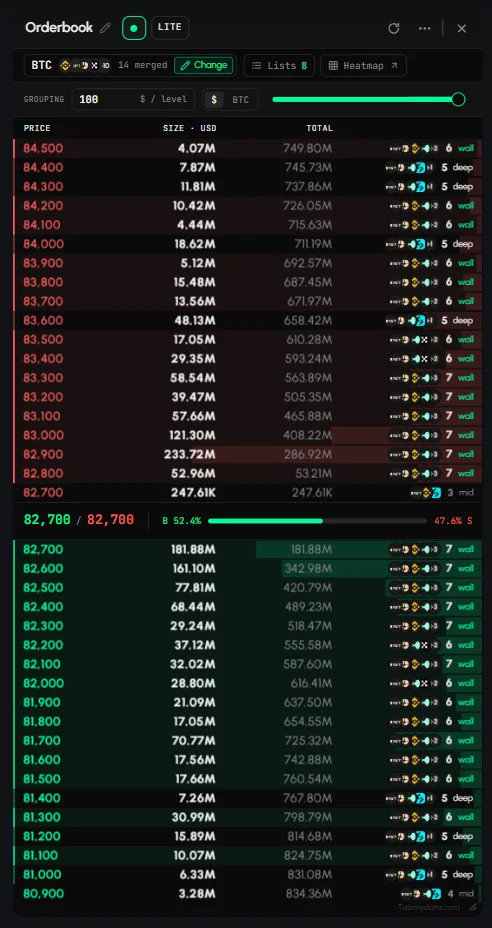
Guide: Tab controls.
What are the canvas controls in the bottom bar?
In the bottom bar you find the Canvas chip (appearance), Fit every tab in view, Zoom out and Zoom in with the zoom percentage, Screenshot workspace, Close all tabs, the minimap toggle, and the tab counter with a list of every open tab. At the bottom left, the exchange status chip (for example "Live 16/16") shows how many connected exchanges are available.
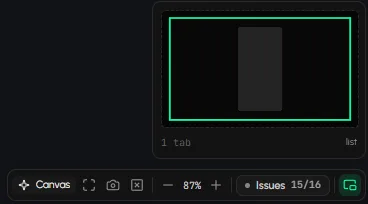
Guide: Create a workspace.
How do I switch workspaces?
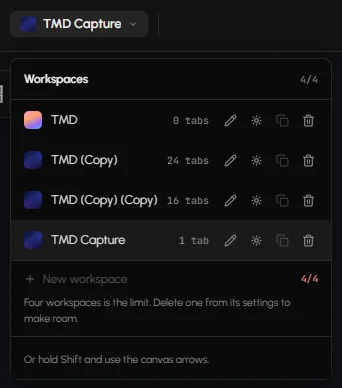
Click the workspace name at the top of the screen and pick another workspace, or use the folded corners at the screen edges ("Turn the page to <workspace>"). See How to manage workspaces.
Frequently asked questions
Where is the add tab button in Tabmydata?
The + at the top of the tool rail. Press T to open it from the keyboard.
How do I see all my tabs at once?
Click Fit every tab in view in the bottom bar.
What does "LIVE" in a tab's title bar mean?
It is the tab's status badge: the tab is streaming live data. Use the pause button to freeze that tab's feed and click it again to resume.
Can I hide the tool rail?
Yes. Dock it into the logo, and click the logo to open it again.
Where is the Dashboard?
Click the logo, click Dashboard on the tool rail, or press D. Nothing on the canvas is lost.