Messages
How messages work
In Tabmydata you chat with friends from the Messages page or from the chat icon in the top bar, without leaving your workspace. A red count shows unread messages, the chat list shows who is online, and Search finds a chat or a friend.
On this page
Messages has two parts: Chats, your conversations, and Friends, the people you can message.
What you can do
- See your unread count on the chat icon, in the sidebar and in the Dashboard.
- Open a recent chat from the top bar dropdown.
- Search your chats and your friends.
- See who is online.
- Add and manage friends. See Add and manage friends.
How do I open my messages?
- Click the chat icon in the top bar. A red count shows unread messages. The dropdown reads "N unread messages" and lists your recent chats.
- Click a chat to open it. Or open Messages in the sidebar for the full page. A red badge on the sidebar item shows the same unread count.
- On the Dashboard, the Messages card shows your latest chats with a green dot for people who are online. Its pop-out icon opens the Messages page.
How do I read the Messages page?
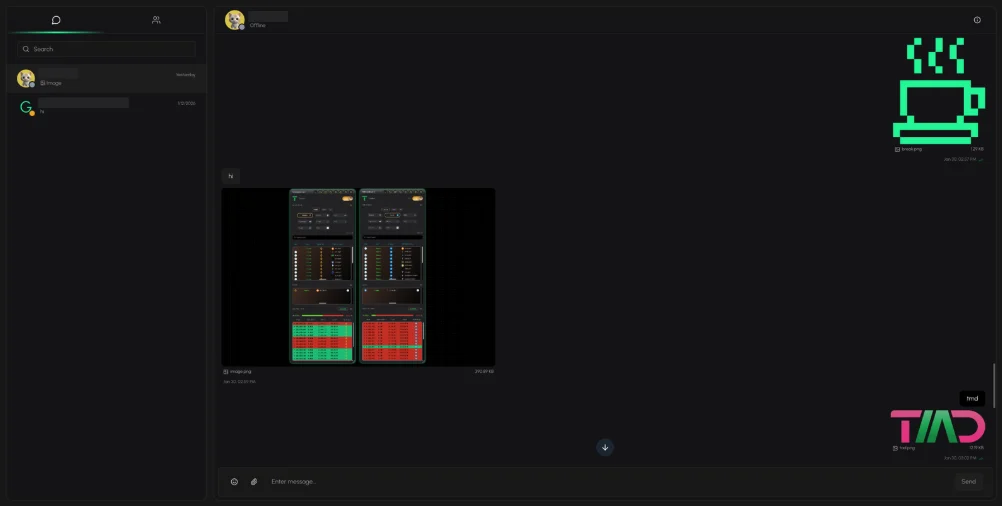
- At the top left, click Chats or Friends. The number next to Friends is a count of pending friend requests (see Friends).
- Use Search to find a chat or a friend.
- In the Chats list, each row shows the person, the date, a preview of the last message and an unread count.
- Click a row to open the conversation on the right. With nothing selected, the pane reads "No conversation selected. Pick a chat from the list to start messaging."
How do I see who is online?
Each person shows a presence dot and a status: Online, Away or Offline. You see it in the Friends list, in the Dashboard card and in your chat list.
How do I stop email about new messages?
Open Settings, Notifications and switch Messages off for email. See Choose which notifications you get.
Frequently asked questions
Can I chat without leaving my workspace?
Yes. The chat icon in the top bar opens your recent chats over the workspace.
Where do I see who is online?
In the Friends list, in the Dashboard Messages card and next to each chat.
Can I block someone?
Yes. See Block and unblock a member.