Alerts & Notifications
How to read and clear your notifications
Your Tabmydata notifications inbox holds release notes, system messages, workspace likes and friend news. Open it from the megaphone in the top bar or from Notifications in the sidebar, filter it by type, and clear the unread count with Mark all read. It is separate from your market alerts, which have their own bell.
On this page
What you can do
- Open the latest notifications from the megaphone in the top bar.
- Read the full inbox, grouped by date.
- Filter by type: Unread, Saved, Likes, Friends, Info, Warnings, Announcements, Alerts.
- Save a notification, delete one, or clear the unread count with Mark all read.
- Open one notification from a direct link.
- Choose what reaches you by email, push and in the app.
How do I open the notifications panel?
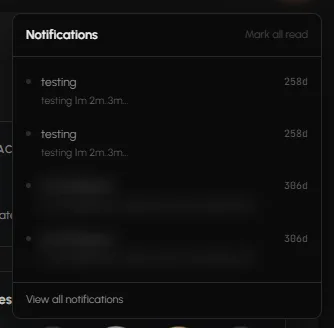
- Click the megaphone in the top bar, next to the bell and the chat icon.
- The panel lists your latest notifications. When it is empty it reads "Release notes and system messages land here."
- Click View all notifications to open the full page.
You can also use Notifications in the sidebar, or the Notifications card on the Dashboard, which shows your latest 3. Its pop-out icon opens the full page.
How do I read the inbox?
The page reads "Platform updates and alerts grouped by date." Items are grouped under date headings, for example OLDER. Each item shows an icon for its type, a title, its text and its date. At the end of the list you see "You've reached the end".
How do I filter notifications?
- On the right, find FILTER.
- Click All, Unread, Saved, Likes, Friends, Info, Warnings, Announcements or Alerts. Each shows a count.
- Likes holds "Workspace likes", for example when someone likes a public workspace.
How do I mark notifications as read?
Click Mark all read at the top of the page or in the megaphone panel. The unread count clears. The button is greyed out when you have no unread items.
How do I save or delete a notification?
- On an item, click the bookmark icon (Save) to save it. It then shows under Saved. Click it again (Unsave) to take it out of Saved.
- Click the bin icon (Delete) to delete it.
How do I open one notification?
Each notification has its own link, ending in ?id=<number>. Opening it takes you to that item. Notifications on the Dashboard use the same links.
How do I choose what reaches me?
- Click Settings at the top of the page, or Manage notifications in the Preferences card ("Choose what reaches you by email, browser push and in-app.").
- Set your channels. See Choose which notifications you get.
Frequently asked questions
Where do I find Tabmydata announcements?
Under the megaphone in the top bar, and on the Notifications page with the Announcements filter.
What is the difference between Notifications and Alerts?
Notifications carry release notes, system messages and account news. Alerts carry market events such as Hyperliquid fills. See The Alerts page.
Can I get notifications by email?
Yes. Choose per type in Notification settings.
Why are there two bells?
The megaphone is for notifications. The bell is for market alerts such as Hyperliquid fills.
Why did a pop-up say "Achievement unlocked"?
You earned a badge. See Badges and achievements.