Account & Settings
How to delete your account
To delete your Tabmydata account, open Profile Settings, go to Account, click Delete account and enter your password to confirm. Deletion is immediate and cannot be undone or restored. Everything in the account is deleted, and there is no option to download your data.
On this page
Before you delete
- Shared workspaces you own are deleted with your account. Need help before you decide? Contact us.
- Think about the other options. To pause, use Take a break. To remove one workspace, see Manage your workspaces.
How do I delete my account?
- Click your avatar in the top bar and choose Profile Settings.
- Open the Account section. On a phone, the sections show as a dropdown at the top: pick Account.
- Scroll to Account Deletion at the bottom of the page.
- Click Delete account.
- Enter your password to confirm.
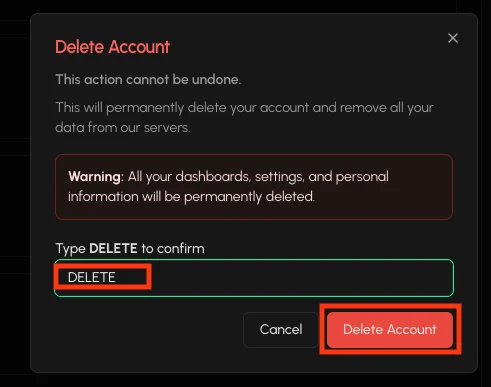
What happens when you delete
- Your account and everything in it is deleted.
- Deletion is immediate.
- It cannot be undone, and the account cannot be restored.
- Anything you own that others rely on, such as shared workspaces and shared items, is deleted too.
Frequently asked questions
Can I undo it or get my account back?
No. Deletion is immediate and cannot be undone or restored.
Can I download my data before I delete?
No. There is no option to download your data.
What happens to shared workspaces I own?
They are deleted with your account.
Can I keep a shared workspace?
Ask the other members to create their own workspace first. Nothing is transferred when an account is deleted. Need help before you decide? Contact us.
How long does deletion take?
It is immediate.