Getting Started
How to use the Tabmydata Dashboard
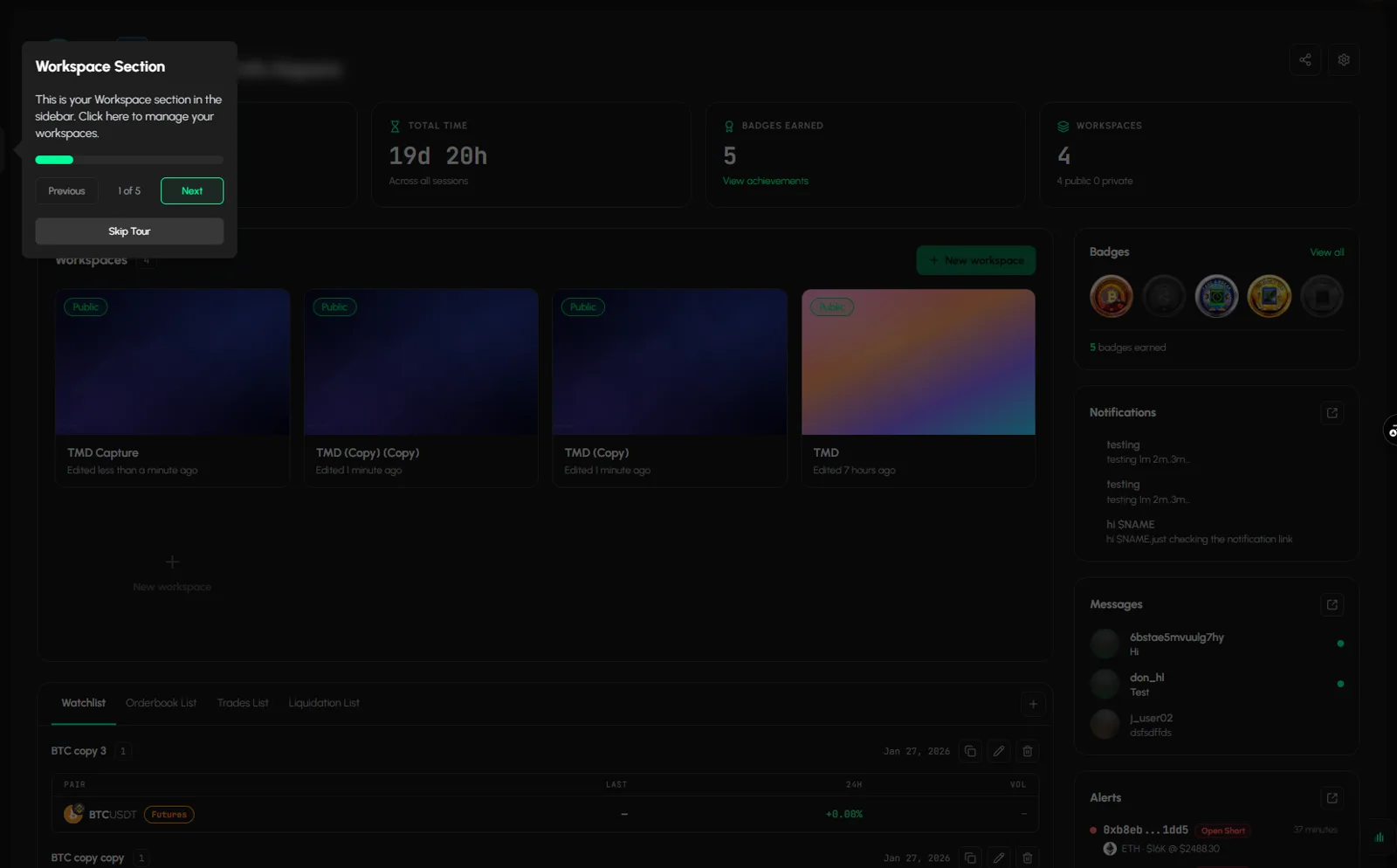
The Tabmydata Dashboard is the home screen of your account and holds all your workspaces. Click Dashboard in the sidebar, or click the logo (or press D) inside a workspace, to get back to it. You see your workspaces, usage, saved lists, badges and the latest notifications, messages and alerts, then open a workspace and get to work.
On this page
If a guided tour card appears over the Dashboard, click Skip Tour to dismiss it. You can replay hints later. See Start the tutorial.
What you can do on the Dashboard
- Open any of your workspaces, or create a new one.
- See how long you have spent in Tabmydata today and in total.
- Check how many workspaces are public and how many are private.
- Browse your saved lists (Watchlist, Orderbook List, Trades List, Liquidation List), and duplicate, edit, delete or add a list.
- See your badges and jump to all your achievements.
- Read your latest notifications, open your recent chats and watch live Hyperliquid fills, each with a button that opens the full page.
How do I get to the Dashboard?
From any page:
- Click Dashboard at the top of Main Menu in the left sidebar.
From inside a workspace:
- Click the Tabmydata logo at the top left, click Return back on the tool rail, or press D.
- A Leave this workspace box appears: "The logo goes up a level, to the dashboard that holds every workspace. Nothing on this canvas is lost."
- Click Leave to go to the Dashboard, or Stay to keep working.
What is in the Dashboard header?
- At the top left you see your avatar, your @nickname and "Welcome back, <your name>".
- At the top right, the Share profile icon shares your public profile. It opens the Share your profile dialog with X, Facebook, Reddit and WhatsApp. See Your public profile.
- The gear icon opens Settings. See Edit your profile and avatar.
What do the four usage cards show?
The top row has four cards. The numbers are yours and update live.
- Time spent today: your time in Tabmydata today, with today's date under it.
- Total time: your time "Across all sessions".
- Badges earned: how many badges you have. Click View achievements to open your profile. See Badges and achievements.
- Workspaces: how many workspaces you have, with the split, for example "4 public, 0 private".
How do I open or create a workspace?
- Find Workspaces in the middle of the page. The chip next to the title is your workspace count.
- Each card shows a cover, the name, a Public badge if the workspace is public, and "Edited N ago".
- Click a card to open that workspace.
- Click New workspace (top right of the panel) or the dashed New workspace tile to create another. You can have 4 workspaces per account. At 4, the button and the tile are disabled and the button reads "Maximum 4 workspaces reached".
Hover a card to show its actions: Settings, Duplicate, Share and Delete. For the full list with a filter box, and for renaming, duplicating, sharing or deleting step by step, see Manage your workspaces.
How do I use the saved lists panel?
The bottom of the Dashboard holds your saved lists in four tabs: Watchlist, Orderbook List, Trades List and Liquidation List.
- Click a tab to see the lists of that type.
- Each list shows its name, how many pairs it holds, its date and a table with PAIR, LAST, 24H and VOL for every pair.
- Use the icons on the right of a list: copy to duplicate it, the pencil to edit it, the bin to delete it. The pencil opens an Edit Watchlist dialog where you change the name and the pairs.
- Click + (top right of the panel) to add a new list.
The same lists live on the Tracking page. See Your Tracking page. To save a list from a tab, see Save and load coin lists.
What the right column shows
- Badges: a row of earned and locked badges, a View all link and "N badges earned".
- Notifications: your latest 3 notifications. Click one to open it, or click the pop-out icon to open the full page. See Read and clear your notifications.
- Messages: your latest chats, with a green dot for people who are online. The pop-out icon opens Messages. See How messages work.
- Alerts: live Hyperliquid wallet fills: wallet, action chip, age, coin, and notional at price. View all alerts opens the Alerts page. See The Alerts page.
Dashboard or workspace: which is which?
- Dashboard: the home screen that holds every workspace.
- Workspace: the canvas where tabs live. Tour: Workspace tour.
Frequently asked questions
How do I get back to the Dashboard?
Click Dashboard in the sidebar. Inside a workspace, click the logo, click Return back on the tool rail, or press D, then click Leave.
Will I lose my tabs if I leave a workspace?
No. The box says nothing on the canvas is lost.
Is the Dashboard the same as a workspace?
No. The Dashboard is your home screen. Workspaces are where you add and arrange tabs.
What is the dashed New workspace tile?
A shortcut to create another workspace. It is greyed out once you have 4.
How do I make or save a list?
Lists are created from the Orderbook, Trades, Liquidations and Watchlist tabs, then edited here with the pencil. See Save and load coin lists.
Why can't I click anything on my Dashboard?
A guided tour card may be covering the page. Click Skip Tour to dismiss it.