Getting Started
How to switch between LITE and PRO mode
LITE and PRO are two display modes for your tabs. Both reach every figure and show the same data.
On this page
LITE is the simple default and a good place to start. PRO adds the full coin picker and a Send to workspace action in the title bar.
How to switch one tab type
- Look in the tab's title bar for the LITE | PRO switch.
- Click PRO to turn it on, or LITE to go back.
Some tabs show a single Display density button instead. Click it to toggle between LITE and PRO.
The switch applies to every tab of that type, one tab type at a time.

How to set the mode from workspace settings
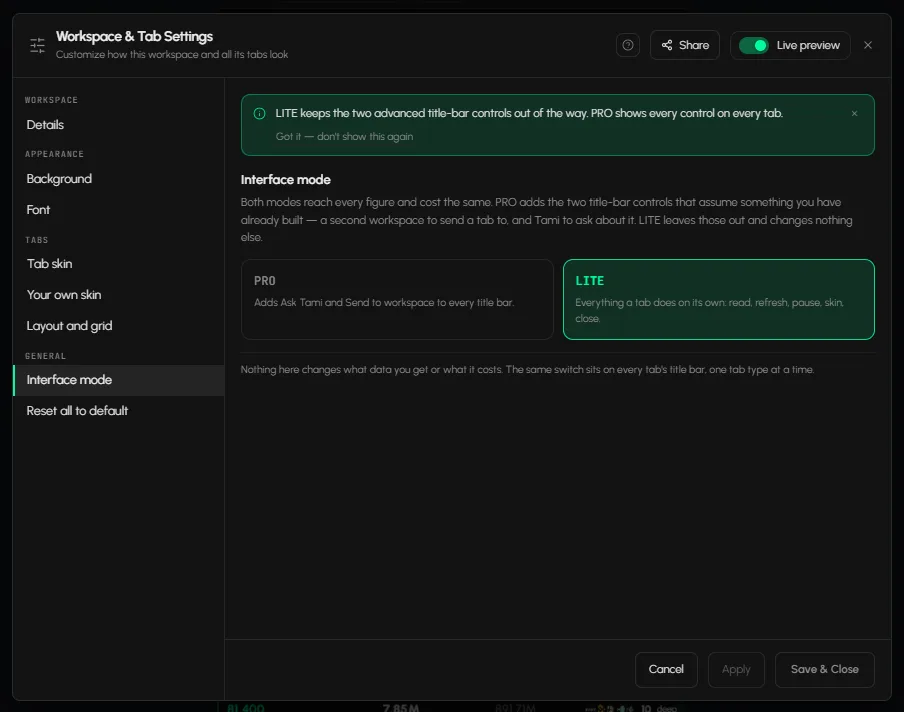
- Open Workspace settings and go to Interface mode.
- Pick PRO or LITE.
- Click Save & Close.
PRO adds Send to workspace to every title bar. LITE leaves it out and changes nothing else: everything a tab does on its own stays (read, refresh, pause, skin, close).
How to get the full coin picker
In Orderbook and Charts, LITE shows a grid of popular coins. To search every listed coin and pick the exact market, click Switch on the More coins card. Details: How to choose coins and exchanges in a tab.
What changes, and what doesn't
| LITE | PRO | |
|---|---|---|
| Data and figures | All | All |
| Tab features | All | All |
| Send to workspace | Not shown | Shown in every title bar |
| Coin picker | Popular coins grid | Full picker |
Frequently asked questions
What is the difference between LITE and PRO?
PRO adds the full coin picker and the Send to workspace action. The data is the same in both.
Which mode should I start with?
LITE. It is the default, and every tab works in it.
Does switching change my data or my layout?
No. Nothing in the mode changes what data you get, and your tabs stay in place.