Workspaces & Tabs
How to read a crypto order book in the Orderbook tab
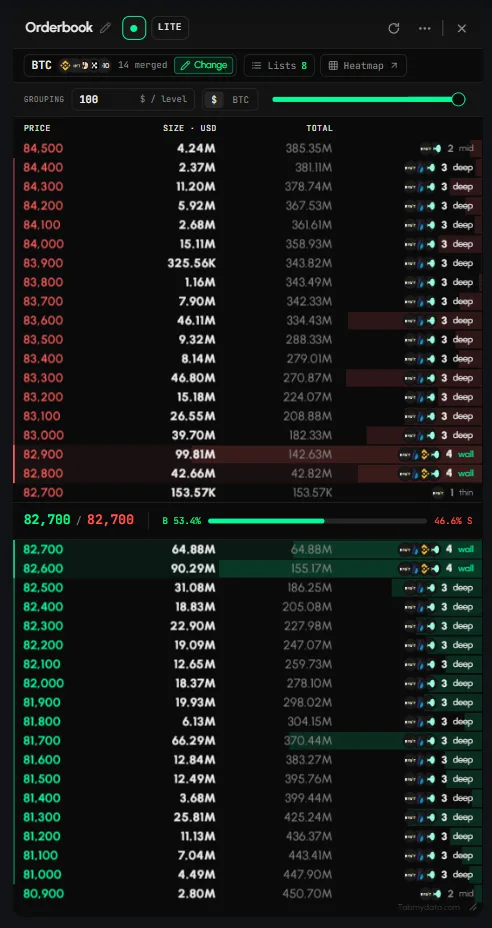
To read a crypto order book in Tabmydata, open the Orderbook tab and pick a coin. It merges the live bids and asks of the futures markets you choose into one ladder. Asks (sell orders) are red above the spread. Bids (buy orders) are green below it. Each row shows which exchanges stand at that price.
On this page
- What you can do
- How do I add the Orderbook tab?
- How do I choose the coin and the exchanges?
- How do I keep a selection as a list?
- How do I load a saved list?
- How do I group price levels?
- How do I switch the size unit?
- How do I read the ladder?
- How do I see which exchanges hold a price level?
- How do I open a heatmap of the same coin?
- How do I pause, refresh and rename?
- How do I move, resize, restyle and close the tab?
- Settings
- States
- Frequently asked questions
- Related
The header line shows what is merged, for example "BTC · +10 · 14 merged" (hover it: "BTC · 21 feeds across 14 exchanges").
Product overview: multi-exchange order book.
What you can do
- Merge many exchanges into one book and remove single markets.
- Load a saved list and set the whole book in one press.
- Group price levels, in dollars or in coin units.
- Read size, running total, spread and the buy/sell balance.
- See which venues stand at each price, with a size tag at a glance, and open a level to get the split by exchange.
- Open a heatmap of the same coin.
- Pause, refresh, rename, resize, restyle and close the tab.
How do I add the Orderbook tab?
- Click + (Add a tab) at the top left of the canvas, or press T.
- Under Orderbook and flow, click Orderbook. Or press Shift + 1.
- Hover the entry to see the preview card and the ready-made presets: BTC deep book (16 venues, $100 grouping), ETH deep book ($10 grouping) and BNB deep book (15 venues, $10 grouping). Click a preset to open the tab already configured.
- A tab added without a preset opens empty. Click Pick a symbol.
How do I choose the coin and the exchanges?
- Click Change in the header row (left).
- Step 1. At the top of the panel, the Futures | Spot pill sets the market type. Futures is the default. A book reads one market type, never a mix.
- Pick a coin. In LITE the grid has 24 coins: BTC, ETH, SOL, BNB, XRP, DOGE, ADA, LINK, AVAX, TON, TRX, DOT, SUI, APT, NEAR, ARB, OP, LTC, BCH, ATOM, UNI, HYPE, PEPE and SHIB. Each tile shows its market count, for example "BTC 21 markets".
- Click Review N markets. The list shows every market that will feed the book, with its exchange and market type.
- Remove a market you do not want with the x on its row.
- Click the final button, which names your choice, for example Read BTC on 21 markets. The book starts streaming. Back returns to the coin grid.
Tip: the book fills about two seconds after you apply a selection or reload the tab.
How do I pick a coin that is not in the grid?
The More coins (PRO) row in the Change panel has a Switch button. It opens a search over every listed coin, where you pick the exact market. See How to choose coins and exchanges in a tab.
How do I keep a selection as a list?
- After you click Read, a dialog asks Keep this selection as a list?
- The name field is pre-filled, for example "21 markets". Change it if you like.
- Click Save and apply to keep it. Click Not now to apply without saving. Cancel closes the dialog.
How do I load a saved list?
- Click Lists. The button shows how many lists you have.
- A side panel titled "Book" opens: "Load a book you have already built".
- Each row shows the list name, the type (SPOT or FUTURES), its age, and its size, for example "30 markets · 15 exchanges". The panel shows only the lists you saved yourself.
- Click a row. One press sets the whole book.
- Click Back to close the panel.
A list that mixes spot and futures loads with a warning: "Loads without 22 on the other side. A book reads one." An order book reads one market type at a time, so only one side of a mixed list loads.
The panel loads lists. It has no rename or delete controls. More: How to save and load coin lists.
How do I group price levels?
Grouping merges nearby prices into one row, so many small orders read as one level.
- Find GROUPING above the ladder.
- Type a value and press Enter, for example 1, 10 or 100. Or drag the slider next to it.
- The label reads $ / level. The ladder condenses to that step.
- A new tab shows raw price steps until you set a value. Your value stays after you reload the page.
Tip: if every row looks like its own price, raise the grouping. If the book looks too coarse, lower it.
How do I switch the size unit?
- Click the $ | BTC toggle next to the grouping slider. The label shows the coin you read, for example BTC.
- The column header changes to SIZE · USD or SIZE · BTC.
Before a coin is picked, the same toggle reads QUOTE | BASE.
How do I read the ladder?
- The columns are PRICE, SIZE, TOTAL (cumulative) and the venues cell on the right.
- Asks are red at the top, bids green below.
- The spread row in the middle shows the best ask and best bid, for example "83,300 / 83,200", and a balance bar with the buy and sell shares, for example B 49.6% and S 50.4%.
- Depth shading sits behind SIZE and TOTAL.
- The venues cell shows exchange logos, a count (for example 14) and a small tag.
- Roll the mouse wheel over the ask or bid ladder to scroll the book. Over the spread row, the wheel zooms the canvas instead.
What do the depth tags mean?
The tags (wall, deep and thin) say how thick the resting orders are at that level. They are an at-a-glance size indicator for buy or sell orders sitting at that price. They are not a signal and not a prediction.
A wall that holds over time is more established than one that just appeared. To see how long a level has held size, open the heatmap of the same coin: a persistent wall shows there as a continuing line, not a single dot. See How to read the Orderbook Heatmap.
The book shows where orders sit now. Orders can be moved or pulled at any time.
How do I see which exchanges hold a price level?
- Click any row.
- A side panel opens, titled for example "Ask 84,600 · Size by exchange". It shows the total (for example 27.92M USD), the range, and "Live · updates with the book".
- Below it, each exchange appears with its size and its share, for example "Binance 42.4%", with a line per market such as "Perp · BTCUSDC 7.45M".
- Close it with x.
How do I open a heatmap of the same coin?
Click Heatmap (arrow icon) in the header. An Orderbook Heatmap tab opens on the same coin. The button is disabled until a coin is set ("Pick a symbol first"). See How to read the Orderbook Heatmap.
How do I pause, refresh and rename?
- Pause: click the green dot in the header ("Pause this tab's feed, currently LIVE"). The book freezes. The tooltip becomes "Resume this tab's feed, currently paused". Click again to resume.
- Refresh: click the circular arrow in the header, or Refresh in More (...).
- Rename: click the title or the pencil ("Rename tab").
How do I move, resize, restyle and close the tab?
- Drag the header to move the tab. Drag the bottom-right corner, or the handle "Drag to change the tab height", to resize it.
- More (...) holds Minimize, Refresh, Screenshot, Favourites and Edit appearance. Favourites shows only on this tab. See Tab controls. On a narrow tab the header buttons fold into More; widen the tab to bring them back inline.
- Edit appearance changes Tab Color, Tab Skin and Font for this tab only. See Tab skins and colours.
- Click x to close. The message "Orderbook closed" has an Undo button.
- The LITE | PRO density button applies to every Orderbook tab. PRO adds title-bar controls that assume something you have already built, such as Share to send a tab to a second workspace. See LITE and PRO modes.
Settings
| Setting | Options | Scope |
|---|---|---|
| Coin and markets | Change panel, Lists | This tab |
| Market type | Futures (default) or Spot, one per book | This tab |
| Grouping | Typed value or slider, unit $ / level | This tab |
| Size unit | $ or coin (QUOTE / BASE before a coin is picked) | This tab |
| Feed | Live or paused | This tab |
| Edit appearance | Tab Color, Tab Skin, Font | This tab |
| Display density | LITE or PRO | Every Orderbook tab |
States
- Loading: while the tab's data loads, it shows the letter T (the Tabmydata logo) bouncing slowly in a loop, like a ball, until the data arrives. After a page reload the book fills in about two seconds.
- Empty: "Nothing in the book. Choose a coin and the markets to merge, and the book fills from the price out." with a Pick a symbol button. The header reads "No source, pick the markets to merge".
- Paused: the feed is frozen and the button offers Resume.
- Data not loading: if a venue is down, see Data not loading.
Frequently asked questions
How do you read a crypto order book?
Bids (buy orders) sit below the price in green. Asks (sell orders) sit above it in red. Each row shows a price and the size waiting there. The gap between the best bid and best ask is the spread.
Can I see the order book from many exchanges at once?
Yes. The tab merges the markets you choose into one ladder, and each row shows which exchanges stand at that price.
What is price grouping in an order book?
Grouping merges orders at nearby prices into one row, so the structure of the book is easier to read. Set it in the GROUPING field.
What do the wall, deep and thin tags mean?
They show how thick the resting orders are at that price. They are an at-a-glance size indicator, not a signal.
Can one book mix market types?
No. A book reads one market type at a time, and Futures is the default. A saved list that mixes types loads only one side, with a warning.
Does a large order mean price will stop there?
No. The book shows where orders sit now. Orders can be moved or pulled at any time.
Can I save a setup?
Yes. Click Save and apply in the dialog after Read, then load it from Lists.
Which coins can I pick?
LITE offers 24 coins in the grid. More coins (PRO) searches every listed coin.
Can I see how much each exchange holds at a price?
Yes. Click the row. The side panel lists each exchange with its size and share.