Workspaces & Tabs
How to use the Trades tab
To see live crypto trades in Tabmydata, open the Trades tab and pick a coin. It lists every print from the exchanges you choose in one tape, newest on top, with its price, size, exchange and market, and which side took it. Set a minimum size and small prints disappear. The tab is also called Live Trades in older guides.
On this page
- What you can do
- How do I add the Trades tab?
- How do I choose the coin and the exchanges?
- How do I show only buys or only sells?
- How do I filter large trades by size?
- How do I read a print?
- Does the Trades tab have a sound?
- How do I load a saved tape?
- How do I open the same coin in another tab?
- What buttons are in the Trades header?
- How do I pause, refresh, rename, restyle and close?
- Settings
- States
- Frequently asked questions
- Related
Product overview: multi-exchange trade data.
What you can do
- Merge many exchanges into one tape.
- Show buys, sells or both.
- Set a minimum size so small prints disappear.
- Read each print: side arrow, size bar, exchange, market and time.
- Play a sound on very large prints.
- Load a saved tape in one press.
- Open the same coin in an Orderbook, Orderbook Heatmap or Liquidations tab.
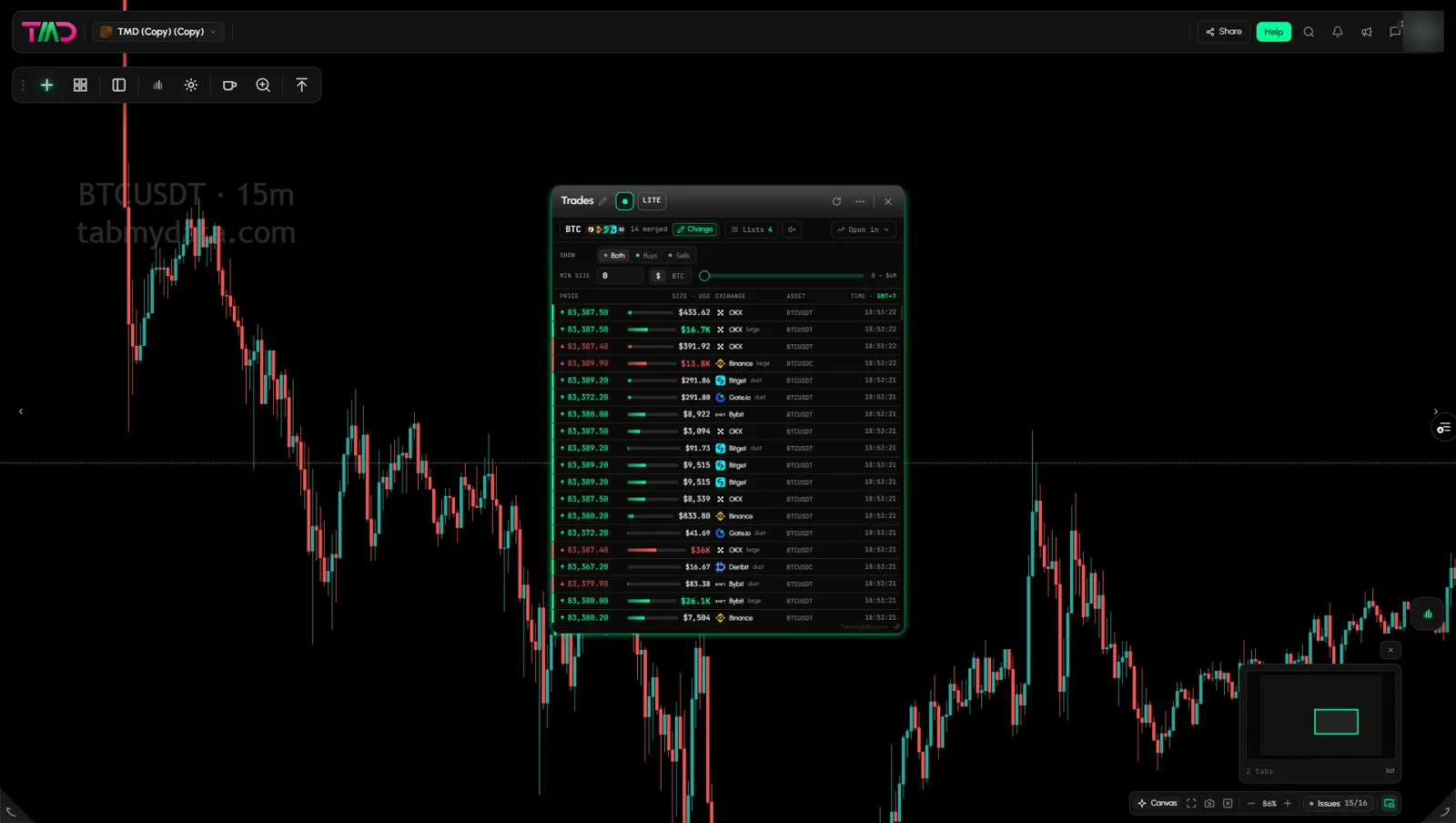
How do I add the Trades tab?
- Click + (Add a tab), or press T.
- Under Orderbook and flow, click Trades. Or press Shift + 2.
- Hover the entry for the presets: BTC tape (16 venues), ETH tape (16) and BNB tape (15). Click one to open the tab already configured.
- Without a preset the tab opens empty. Click Pick a symbol.
How do I choose the coin and the exchanges?
- Click Change in the header row.
- Step 1: at the top, a Futures | Spot pill sets the market type. It starts on Futures. Then pick a coin. LITE offers the same 24-coin grid as the Orderbook, with market counts on each tile.
- Step 2: click Review N markets, remove any market with its x, then click Read BTC on N markets.
- The header shows the merge, for example "BTC · +10 · 14 merged". Hover it for the feed count, for example "BTC · 21 feeds across 14 exchanges".
- A dialog asks Keep this selection as a list? Click Save and apply, Not now or Cancel.
In LITE the review list shows futures markets. A tape reads one market type at a time: a saved list that mixes spot and futures loads "without N on the other side. A tape reads one." For a coin outside the grid, use More coins (PRO). See How to choose coins and exchanges in a tab.
How do I show only buys or only sells?
- Find SHOW.
- Click Both, Buys or Sells.
- Buys keeps the rows with a green up arrow. Sells keeps the rows with a red down arrow.
Your choice stays after you reload the page.
How do I filter large trades by size?
- Find MIN SIZE.
- Type a value and press Enter, or drag the slider. The slider has 13 steps: 0, $100, $1K, $5K, $10K, $25K, $50K, $100K, $250K, $500K, $1M, $2M and $4M. A typed value moves the slider to a step.
- Rows below the threshold disappear. The tape keeps its history, so lowering the value brings the smaller rows back.
- Type 0 to reset the filter.
- Click $ | BTC to change the unit. The SIZE column and the range label switch with it. Before a coin is picked it reads QUOTE | BASE.
Tip: raise MIN SIZE in steps. A very high value, such as $4M, can leave an empty tape on a quiet coin.
Your MIN SIZE stays after you reload the page.
How do I read a print?
| Column | What it shows |
|---|---|
| PRICE | An arrow: up (green) is a buy, down (red) is a sell. A coloured edge marks the side, and large prints get a coloured glow |
| SIZE | The size, with a size bar |
| EXCHANGE | Logo and tags such as "dust", "large", "very large" or "whale" |
| ASSET | The market, for example BTCUSDT or BTCUSDC |
| TIME | In your time zone. The header shows it, for example "TIME · GMT+7" |
The range label under the controls reads "0 - $4M" (or "0 - 50.00 BTC" in coin units). It shows the slider range.
Does the Trades tab have a sound?
Yes. The Trades tab has a speaker button in the controls row. Its tooltip reads "Play a sound on very large and whale prints".
- Click the speaker button to switch the sound on.
- Click it again to mute.
The sound is a separate toggle from MIN SIZE. The Liquidations tab has the same kind of button for large liquidations: see How to use the Liquidations tab.
How do I load a saved tape?
- Click Lists. The button shows your count.
- The panel "Tape" says "Load a tape you have already built". Each row shows name, type, age and size, for example "23 markets · 14 exchanges".
- Click a row. One press sets the whole tape.
- Click Back to close the panel.
The panel has no rename or delete controls. See How to save and load coin lists.
How do I open the same coin in another tab?
- Click Open in.
- Pick Orderbook, Orderbook Heatmap or Liquidations.
The same selection opens in a new tab. See How to open a coin in another tab.
What buttons are in the Trades header?
The header holds the title (click to rename), the LIVE or PAUSED chip, LITE | PRO, Ask Tami (PRO), Minimize, Refresh, Screenshot, Favourites, Share, Edit appearance and Close. On a narrow tab some of them move into More.
How do I pause, refresh, rename, restyle and close?
Same as every tab: the green dot pauses ("Pause this tab's feed"), and while paused the top row stops changing until you resume. The circular arrow refreshes, the title or pencil renames, Edit appearance restyles this tab, and x closes it with Undo. See Tab controls.
Clicking a row does nothing in this tab.
Settings
| Setting | Options | Scope |
|---|---|---|
| Coin and markets | Change, Lists | This tab |
| SHOW | Both, Buys, Sells | This tab |
| MIN SIZE | Typed value or 13-step slider, $ or BTC | This tab |
| Sound | On or muted | This tab |
| Edit appearance | Tab Color, Tab Skin, Font | This tab |
| Display density | LITE or PRO | Every Trades tab |
States
- Empty: "Nothing on the tape. Choose a coin and the markets to merge, and every print lands here, newest on top." with Pick a symbol.
- Loading: while the tab's data loads, it shows the letter T (the Tabmydata logo) bouncing slowly in a loop, like a ball, until the data arrives. After you apply a coin and its markets, prints land newest on top as they arrive.
- Paused: the chip reads PAUSED and the tape freezes until you resume.
- Closed by mistake: closing the tab shows "Trades closed" with Undo.
- Data not loading: see Data not loading.
Frequently asked questions
How do I see large trades?
Set MIN SIZE. Smaller prints disappear and the large ones stay. Rows tagged "large", "very large" or "whale" mark the big prints.
Can I see trades from many exchanges at once?
Yes. Merge them in Change. Each row names its exchange.
Which side took a trade?
The arrow in PRICE: green up is a buy, red down is a sell. Use SHOW to see only one side.
What are the dust, large and whale tags?
Size labels on each print. Dust is small. Large, very large and whale mark progressively bigger prints.
How do I reset the size filter?
Type 0 in MIN SIZE and press Enter.
Is the tape a signal?
No. It lists what printed. What you do with it is your decision, and this is not financial advice.
Can I mix market types in one tape?
No. A tape reads one market type at a time.
Does the tab show my own trades?
No. It shows market prints from the exchanges you merge.