Workspaces & Tabs
How to switch, rename or delete a workspace
To switch workspaces in Tabmydata, click the workspace name at the top of the screen and pick another one. The same menu lets you rename, duplicate, open the settings of or delete a workspace. You can keep up to 4 workspaces, and each keeps its own layout.
On this page
- What you can do
- How do I open the Workspaces list?
- How do I filter and sort my workspaces?
- How do I open a workspace?
- How do I switch workspaces?
- How do I create a workspace?
- How do I rename a workspace?
- How do I duplicate a workspace?
- How do I share a workspace?
- How do I delete a workspace?
- How do I leave a workspace?
- How do I start the tutorial?
- Frequently asked questions
- Related
Use one workspace per routine, for example one for order flow and one for macro context. Each opens exactly as you left it.
What you can do
- See all your workspaces in one list and filter them by name, by Public or Private, and by last edited.
- Open, rename, duplicate, share and delete a workspace.
- Switch workspaces without going back to the Dashboard.
- Start the tutorial from the list page.
How do I open the Workspaces list?
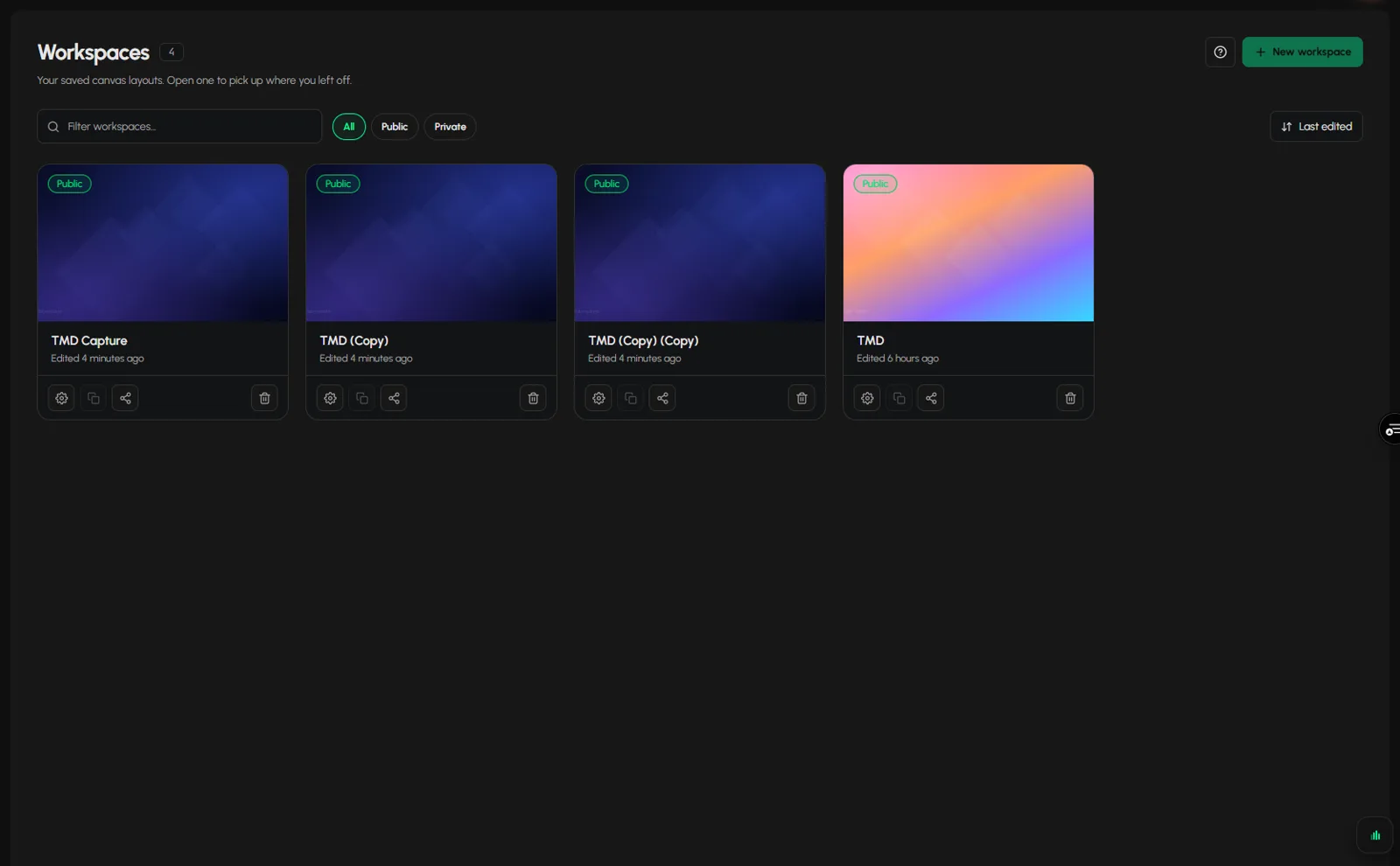
- Click Workspaces in the sidebar. The page reads "Your saved canvas layouts. Open one to pick up where you left off."
- Each workspace is a card with a cover, its name and the time it was last edited. A Public badge marks public ones.
- Hover a card to show its actions: Settings, Duplicate, Share and Delete.
How do I filter and sort my workspaces?
- Type in Filter workspaces... to find one by name.
- Click a chip: All, Public or Private.
- The sort reads Last edited.
How do I open a workspace?
- Click a card, or click Open workspace on it.
- You can also open Workspaces in the sidebar and click a workspace by name in the expanded list.
How do I switch workspaces?
From inside a workspace:
- Click the workspace name at the top of the screen, next to the logo. A menu lists each workspace with its number of tabs.
- Pick another workspace. The canvas changes to it.
You can also click the arrow at the left or right edge of the screen, or press Shift+Left or Shift+Right, to turn the page to the previous or next workspace.
How do I create a workspace?
- Click New workspace in the header or the dashed tile. The switcher menu has a New workspace button too, with a count such as "4/4".
- You can have 4 workspaces. At 4, the button is disabled. See Create a workspace.
How do I rename a workspace?
- On the card, click Settings. The Workspace & Tab Settings dialog opens on Details.
- Change Workspace card name (up to 64 characters).
- Click Save & Close.
Inside a workspace, you can also open the switcher and click Rename on a row to rename it in place, or open the same dialog from the gear on the tool rail. See Workspace settings.
How do I duplicate a workspace?
- On the card, click Duplicate, or click Duplicate on its row in the switcher.
- A copy appears named "<name> (Copy)". Rename it as above.
At 4 workspaces, Duplicate is disabled on the card too.
How do I share a workspace?
- On the card, click Share.
- Copy the link, or share it to Twitter/X, Facebook, Reddit or WhatsApp. The link opens only if the workspace is Public.
How do I delete a workspace?
- On the card, click Delete (the bin), or click Delete workspace on its row in the switcher.
- Confirm.
Deleting removes the workspace, its tabs and its layout for good. If you only want a clean start, use Reset all to default in Workspace settings, which keeps your tabs. See Reset a workspace.
How do I leave a workspace?
Click the logo at the top left (it reads "Leave this workspace"), or press D. A box with Stay and a button to go to the Dashboard appears, and nothing on the canvas is lost. See Dashboard tour.
How do I start the tutorial?
Click Start tutorial on the list page. See Start the tutorial.
Frequently asked questions
Can I have more than one workspace in Tabmydata?
Yes, 4 per account. Keep a separate workspace for each routine and switch between them.
Does each workspace keep its own settings?
Yes. Each has its own layout, background, font and skins. Time zone is not a workspace setting. It is set in the Market Clock and the Calendar tabs.
Can I get a deleted workspace back?
No. Deleting is permanent.
How do I make a workspace public?
In Workspace settings, Details, switch on Public workspace. See Share a tab or workspace.
How many workspaces can I have?
- When you reach 4, New workspace and Duplicate are disabled until you delete one.