Messages
How to block and unblock a member
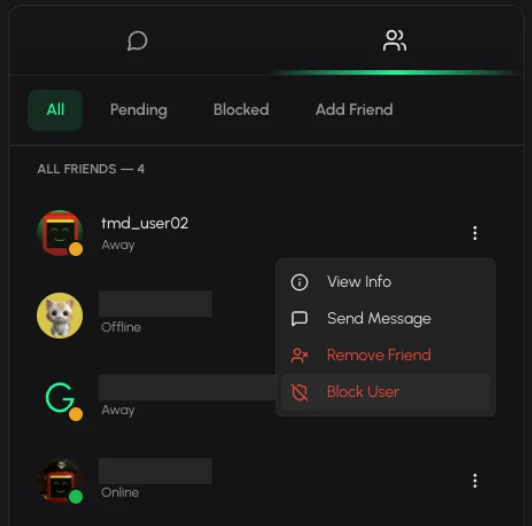
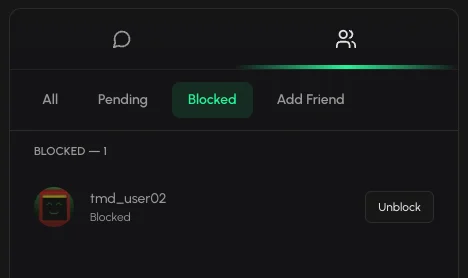
In Tabmydata, open Messages, click Friends, click the three dots on a friend's row and choose Block User. Blocked members are listed under Blocked on the same Friends tab. If you want to stop all new friend requests at once, switch off Allow Friend Requests in Social settings.
On this page
How do I block a member?
- Click Messages in the sidebar, then Friends.
- Click All, find the member and click the three dots on their row.
- Choose Block User.
The same menu has View Info, Send Message and Remove Friend.
How do I see who I blocked?
Open Messages, then Friends, then Blocked. Members you blocked are listed there. When nobody is blocked it reads "No blocked users".
Block, remove a friend or turn off requests: which one?
Three controls, three different jobs.
- Block User is for one member, from their row in your friends list.
- Remove Friend ends one friendship without blocking the person. See how to add and manage friends.
- Allow Friend Requests is one switch for everyone. Turn it off and nobody can send you new requests. See social settings.
Tip: if one person keeps writing to you, block them. If you get requests from many people, turn requests off.
Frequently asked questions
How do I block a user on Tabmydata?
Messages, Friends, All, then the three dots on their row and Block User.
Where is my block list?
Open Messages, then Friends, then Blocked.
Can I stop all new requests instead?
Yes. Use Allow Friend Requests in Social settings.
What is the difference between Remove Friend and Block User?
Remove Friend ends the friendship. Block User is for a member you do not want to deal with. Both are in the three-dot menu on a friend's row.