Account & Settings
Badges and achievements
Tabmydata awards 8 badges as you explore the product, such as Session Explorer, Sharer, First Break, Tab Master, Customizer and three login streaks. You see the ones you have earned, and the ones still locked, on your Dashboard and your profile. A pop-up tells you when one unlocks.
On this page
What you can do
- See how many badges you have earned.
- See which badges are still locked.
- Open the full list of achievements.
- Learn how each badge unlocks.
What are the 8 badges and how do I earn them?
| Badge | How it unlocks |
|---|---|
| Session Explorer | Visit the Dashboard, Profile, Workspace, Notifications and Alerts. |
| Sharer | Share a profile for the first time. |
| First Break | Complete your first 15-minute break. |
| Tab Master | Open all 12 tabs: Orderbook, Trades, Liquidations, Charts, News, Heatmap, Watchlist, Fear & Greed, Hyperliquid Whale Tracker, Alerts, Calendar and Coin Info. |
| Customizer | Customise Tab Color, Tab Skin and Background. |
| 3-Day Streak | Log in 3 days in a row. |
| 7-Day Streak | Log in 7 days in a row. |
| 21-Day Streak | Log in 21 days in a row. |
Tips for each badge
- Session Explorer: open the Dashboard, your Profile, a Workspace, Notifications and Alerts at least once. The pop-up says "Visited all 5 main features".
- Sharer: use Share Profile on your profile. See Your public profile.
- First Break: start a break with Take a break (shortcut B) and let the 15 minutes run. The badge reads "Completed your first 15-minute break". See Take a break.
- Tab Master: add and open each of the 12 tabs listed above, from Add a tab. See Tab catalog.
- Customizer: change the Tab Color, the Tab Skin and the Background. See Tab color and skin and Background customization.
- 3-Day, 7-Day and 21-Day Streak: log in that many days in a row.
When a badge unlocks, a pop-up reads "ACHIEVEMENT UNLOCKED" with the badge name and its rule. For Session Explorer the line is "Visited all 5 main features".
Where do I see my badges?
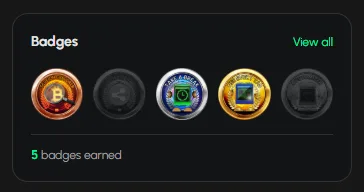
- Dashboard: the Badges earned card shows the count, with View achievements. The Badges card in the right column shows a row of earned and locked badges, View all and "N badges earned".
- Profile: the Badges section lists the ones you earned, "N earned", locked ones with "more to unlock" and All achievements.
Locked badges are greyed out.
How do I open all achievements?
- Click View all on the Dashboard card, View achievements on the Badges earned card, or All achievements on your profile.
- The list shows every badge with its rule. Locked ones stay greyed out until you earn them.
Tip: the quickest way to earn more is to try the tabs and settings you have not opened yet.
Frequently asked questions
What are Tabmydata badges for?
They mark that you have explored parts of Tabmydata.
How do I earn more badges?
Use the table above. Each badge shows its rule in the achievements list.
Which badge needs a login streak?
The three streak badges: 3-Day, 7-Day and 21-Day. Each needs that many days in a row.
Do breaks earn a badge?
Yes. Your first completed 15-minute break earns First Break. See Take a break.
Do other members see my badges?
Your profile shows them. See Your public profile.