Liquidations
Crypto liquidation tracker, live across exchanges
Help: How to track live liquidations in the Liquidations tab
Learn: Liquidity Heatmap vs Liquidation Heatmap
This crypto liquidation tracker shows forced closes live, across the exchanges you pick, with longs in red and shorts in green. It merges forced closes from the exchanges you pick into one feed, splits longs and shorts over 5m to 4h, and reads the flow against its normal. The totals are a floor, not a total. Free during Alpha.
Free during Alpha.
What's happening
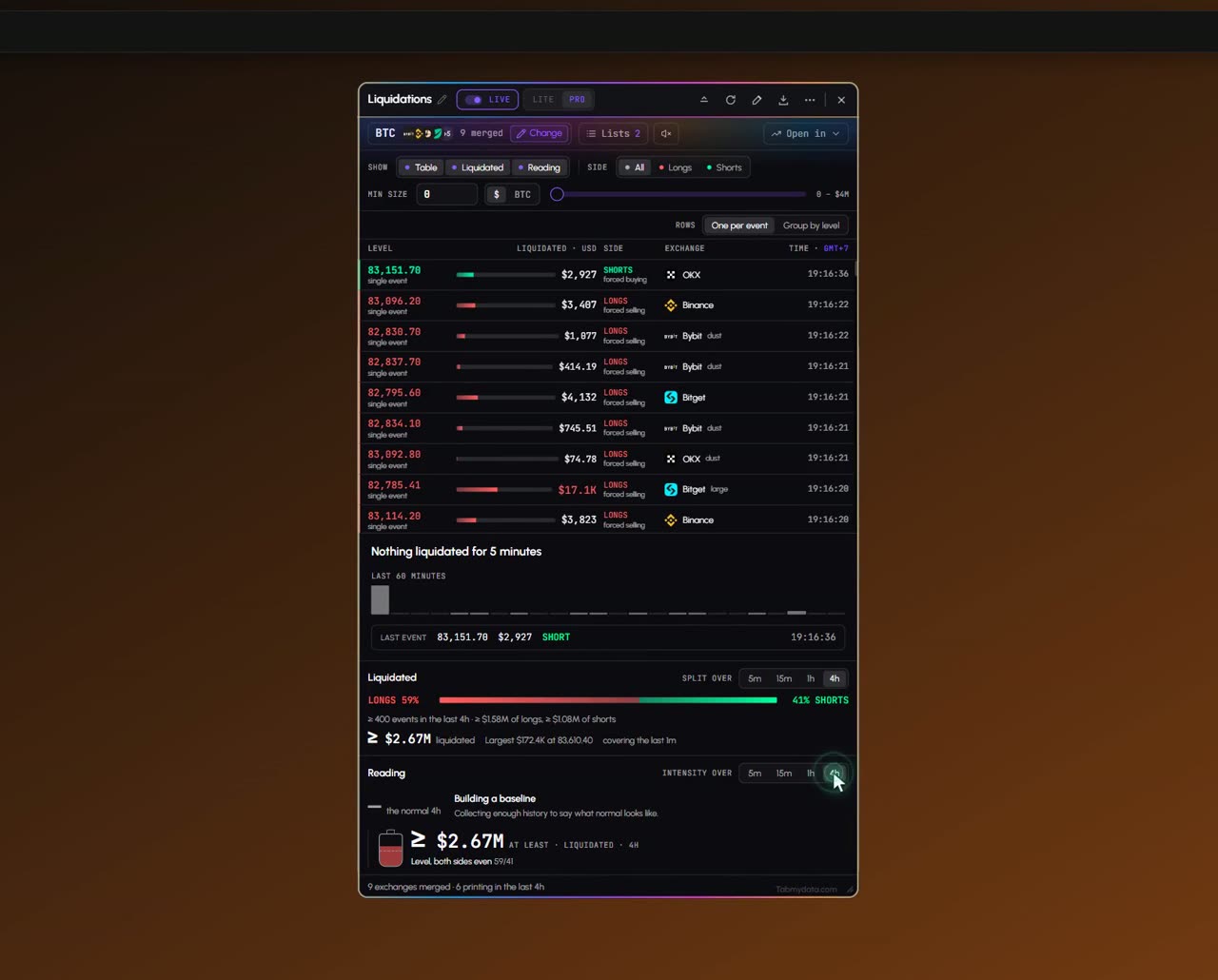
Live liquidation feed
Forced closes stream in across the markets you select. Longs show in red, shorts in green, each with its size and exchange.
Product tour
What you can do in the Liquidations tab
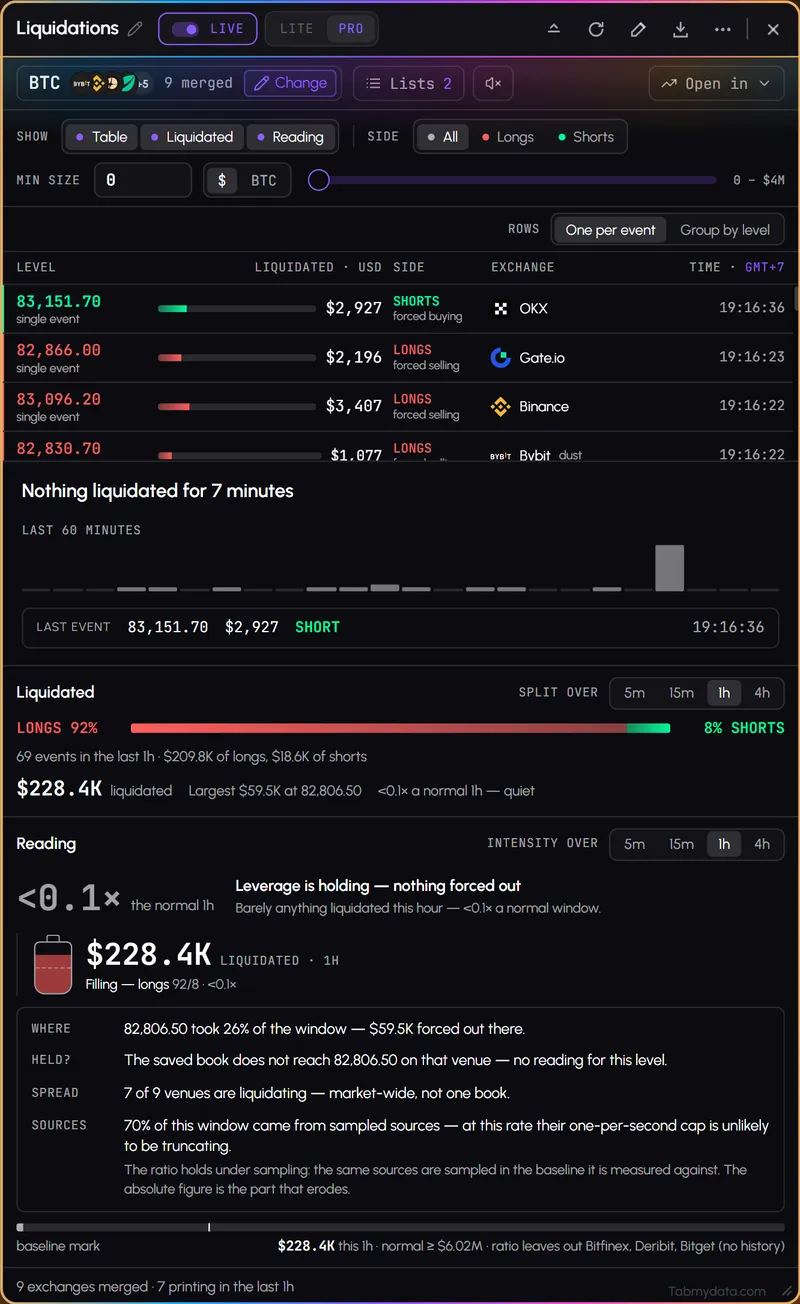
Liquidations is a live crypto liquidation tracker: forced closes from many exchanges in one feed, and you can follow Bitcoin liquidations or any other futures coin you pick. Longs show in red, shorts in green, each with its size and exchange. Read it three ways: as a table of events, as long and short totals over 5m to 4h windows, or as a reading of how hard the flow is against normal. Set a minimum size, group nearby events into one row and check the totals.
Features
- 01
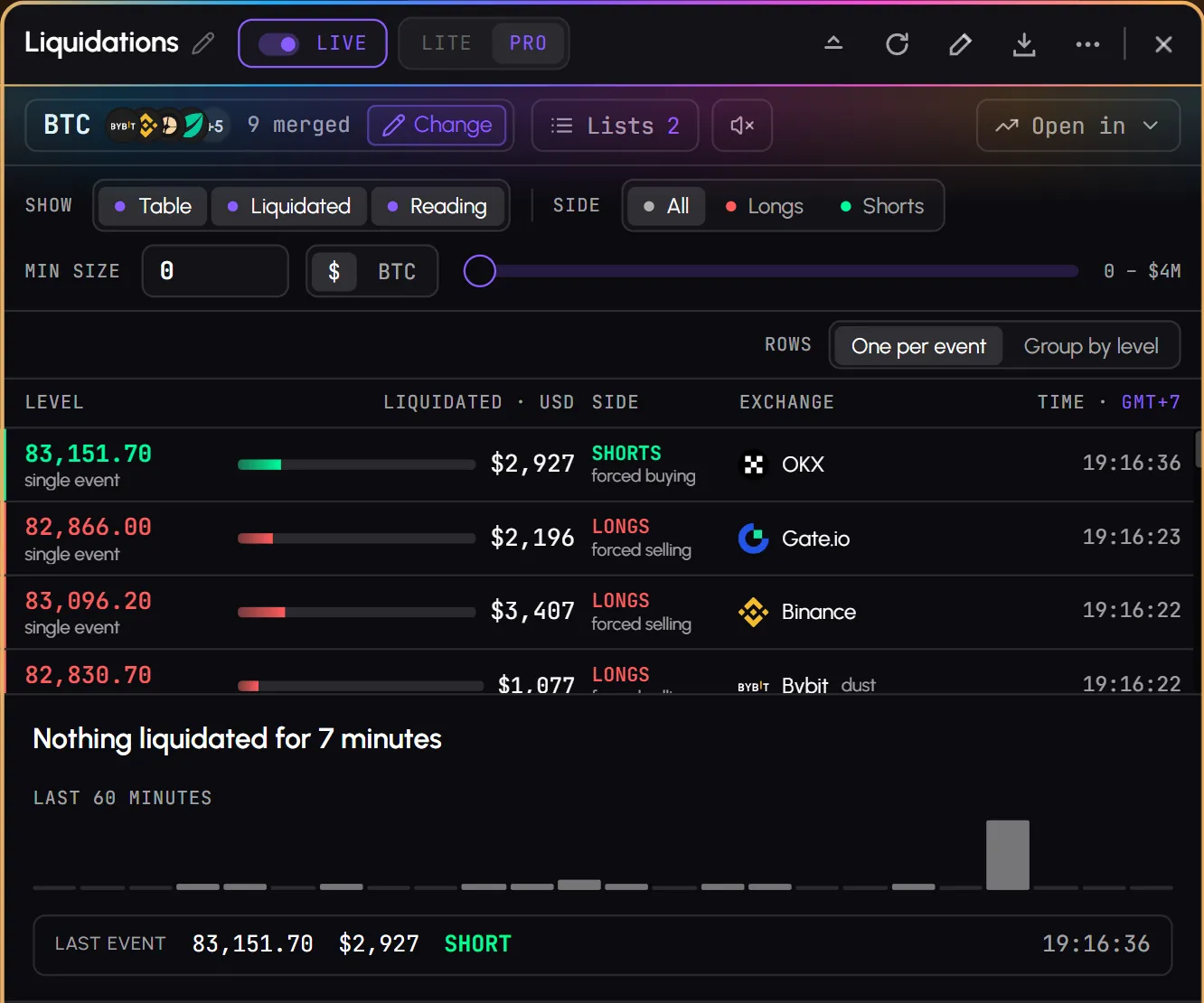
Live liquidation feed
Long and short liquidations across the markets you select, newest on top. Each row has the level, the size in USD, the side, the exchange and the time. Large and dust tags mark the biggest and the smallest. How to set it up: track crypto liquidations live.
- 02
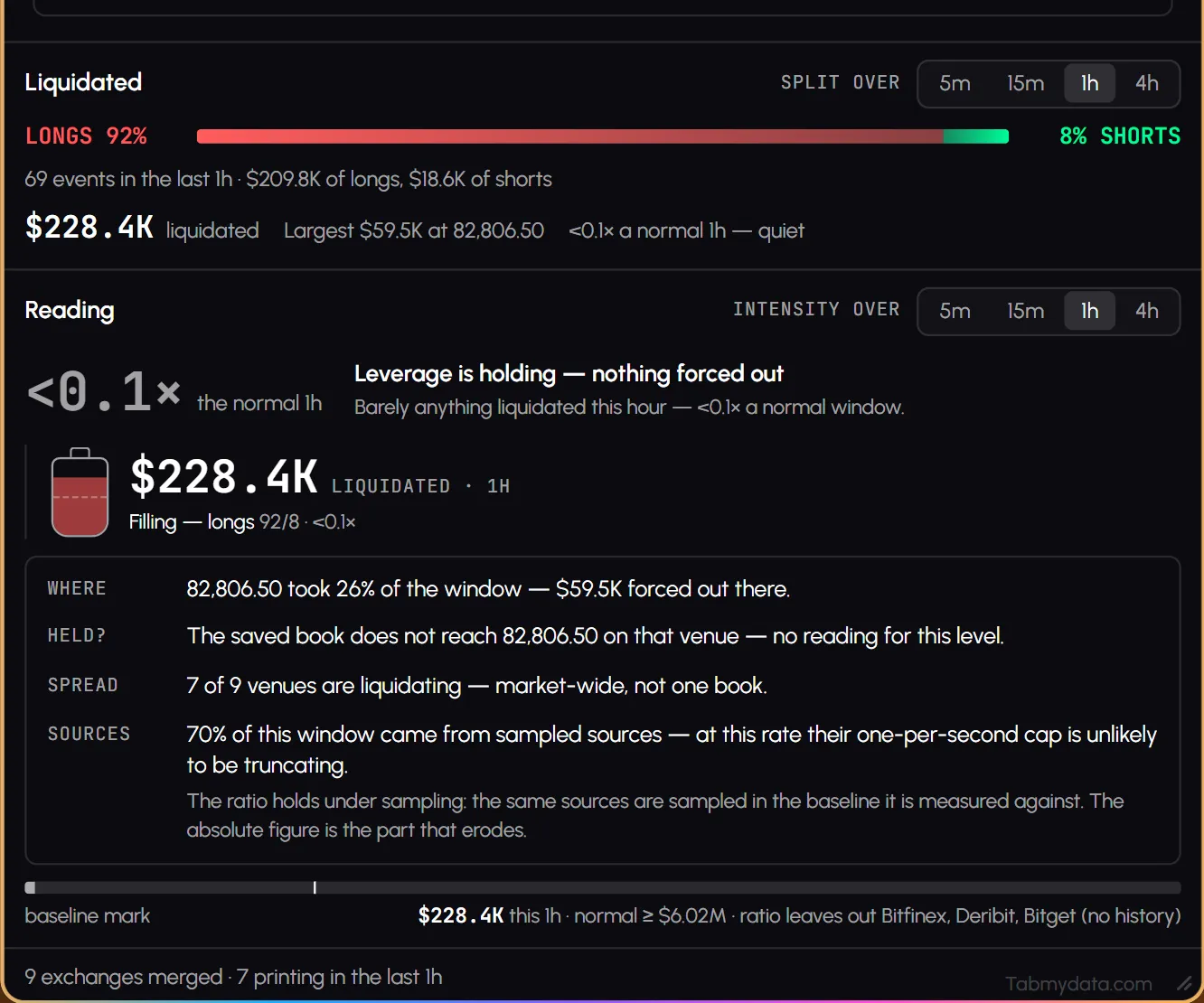
Three sections: Table, Liquidated, Reading
Switch them on or off with SHOW. Table is the event list. Liquidated splits longs and shorts over 5m, 15m, 1h and 4h, with the event count and the largest single close. Reading compares the current intensity with what is normal for that coin, over 5m, 15m, 1h or 4h. It describes what already happened. It is not a forecast.
- 03
Group by level: liquidation clusters by price
Choose one row per event, or group by level: events that land close together in price and within seconds of each other become one row, with a count. A burst reads as a few lines instead of fifty.
- 04
Side filter
Watch only longs, only shorts, or both.
- 05
Size filter and units
Type a minimum size or drag the slider, and read sizes in the coin or in dollars.
- 06
Totals are a floor
The totals give a quick read of how much has been liquidated. They are a floor, not a total.
- 07
Sound, pause and lists
A speaker button plays a sound on very large and whale liquidations. Pause the feed while you read. Save a selection as a list and load it in one press.
- 08
Open in
Send the same coin to Charts, the Orderbook, the Orderbook Heatmap or Live Trades and see liquidations on the chart.
Use cases
How traders use it
- 01
Fast move
Watch whether longs or shorts are being closed, with small liquidations filtered out.
- 02
After a flush
Switch to Liquidated and compare the last 5 minutes with the last 4 hours.
- 03
Busy burst
Turn on Group by level so a cascade reads as a few rows.
How do I track Bitcoin liquidations?
Bitcoin is the coin most traders open first. In the Liquidations tab, press Change, pick BTC and its futures markets, and the feed shows Bitcoin liquidations as they print: red rows for longs closed, green rows for shorts closed. Set a minimum size so small events drop out, then switch to Liquidated to compare the last 5 minutes with the last 4 hours. It shows what already happened. It does not say where the next liquidation will be. You can also see liquidations on the chart, and modeled liquidation levels are a separate, labeled estimate.
How do you read long and short liquidations side by side?
A long liquidation is a leveraged buyer's position closed by force, a forced sell. A short liquidation is a leveraged seller's position closed by force, a forced buy. The Side filter lets you watch only longs, only shorts or both, and the Liquidated section splits the two over 5m, 15m, 1h and 4h windows. When one side dominates a window, you can see it at a glance, next to the event count and the largest single close. The glossary explains long and short liquidations.
Who it's for
- Derivatives traders who want to see which side is being closed during a fast move.
- Short-term traders who keep the feed beside a chart and the order book.
- Anyone checking today's liquidations who wants the large ones without the noise.
How to use it
- Open the Liquidations tab and press Change to pick a coin and its futures markets, or start from a saved list. Step by step: track crypto liquidations live.
- Set a minimum size and choose coin or dollar units.
- Pick the sections with SHOW: Table for events, Liquidated for long and short totals by window, Reading for intensity against normal.
- Pick a side (All, Longs or Shorts) and one row per event or Group by level.
- Read the feed. Red rows are longs closed, green rows are shorts closed.
- Put it beside a chart to see liquidations on the chart, or beside the Orderbook Heatmap.
- For estimated levels, open the Liquidation Heatmap (modeled): its own tab, or a layer in Charts.
Related tools
- Liquidation heatmap: modeled levels by price over time, its own tab and a layer in Charts.
- Charts: liquidations on the chart.
- Orderbook Heatmap: where order-book liquidity sat.
- Hyperliquid Whale Tracker: positions of large accounts.
- Live Trades: ordinary prints beside forced ones.
FAQ
Liquidations FAQ
What's the difference between long and short liquidations?
A long liquidation is a buyer's leveraged position closed by force, shown in red. A short liquidation is a seller's leveraged position closed by force, shown in green.
Where can I see crypto liquidations live?
In Tabmydata's Liquidations tab. It streams forced closes from many futures exchanges in one feed, with longs in red and shorts in green.
Which markets are covered?
Futures markets across many exchanges. Spot markets have no liquidations, so the tab only offers futures. Pick your own coin and markets in the Change panel, or start from a saved list.
Does it show where liquidations will happen?
No. This feed shows forced closes that already happened. For estimated levels, see the liquidation heatmap (modeled): its own tab, and also a layer in Charts.
Is there a Bitcoin liquidation tracker?
Yes. Open the Liquidations tab, press Change and pick BTC with its futures markets. The feed streams Bitcoin liquidations with the side, size, exchange and time. Free during Alpha.
Are crypto liquidation totals complete?
No. The totals are a floor, not a total.
Free during Alpha.
This crypto liquidation tracker shows forced closes live, across the exchanges you pick, with longs in red and shorts in green. It merges forced closes from the exchanges you pick into one feed, splits longs and shorts over 5m to 4h, and reads the flow against its normal. The totals are a floor, not a total. Free during Alpha.
Sign up free