Getting Started
How to set up your first workspace
To set up your first trading workspace in Tabmydata, open a workspace from the Dashboard, then either start from a ready-made desk or add tabs one by one with Add a tab. Point each tab at a coin, then arrange the tabs side by side. You do this setup once, and the workspace keeps it.
On this page
A workspace is the screen where your tabs live. What a workspace can hold: crypto trading workspaces.
How do I open or create my workspace?
- Open the Dashboard after you sign in.
- Click a workspace card to open it, or click New workspace (or the dashed New workspace tile) to create one. You can have 4 workspaces.
- The workspace opens on its canvas.
To go back to the Dashboard later, click the logo or press D. See Dashboard tour.
How do I start from a ready-made desk?
An empty canvas offers ready-made desks. Each one opens the tabs and arranges them:
- BTC depth: Orderbook, Trades, Liquidations
- One chart, wide: Charts, Orderbook Heatmap, Watchlist, Coin Info
- ETH swing: Charts, Watchlist, Orderbook, Coin Info
- Events and news: News, Calendar, Market Clock
- Sentiment scan: Heatmap, Fear & Greed, Hyperliquid Whale Tracker
Click one to start. You can add or close tabs afterwards.
How do I add a tab?
- Click Add a tab on the tool rail, or press T.
- Type a name in Search tabs, for example "Orderbook" or "Heatmap".
- Hover a tab to see what it does and its ready-made presets. Click the tab, or its Add button, to put it on the canvas. The catalog closes and the tab is saved with the workspace.
Tabs are grouped as Orderbook and flow, Charts and analysis, Market data, News and events, and Tools. Many tabs also have a keyboard shortcut, for example Shift+1 for Orderbook and Alt+8 for Alerts. See Search and keyboard shortcuts.
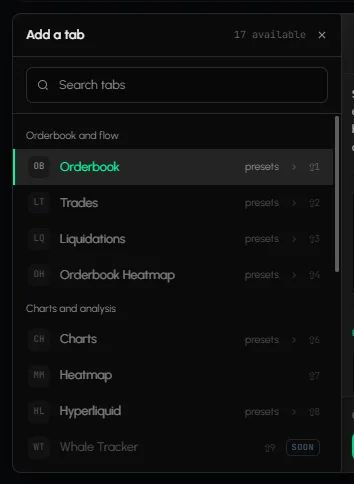
How do I choose the coin and exchanges for a tab?
Click Change in the Orderbook tab, or the coin in Charts, and pick the coin. Details: How to choose coins and exchanges in a tab.
How do I arrange my tabs?
- Drag a tab by its title bar to move it.
- Drag the bottom-right corner to resize it.
- Open Layout on the tool rail, or press L, and pick an arrangement: Tidy, Columns, Rows, Lead + strip, Two-up or Sidebar.
- Click Fit every tab in view in the bottom bar to bring all tabs into view.
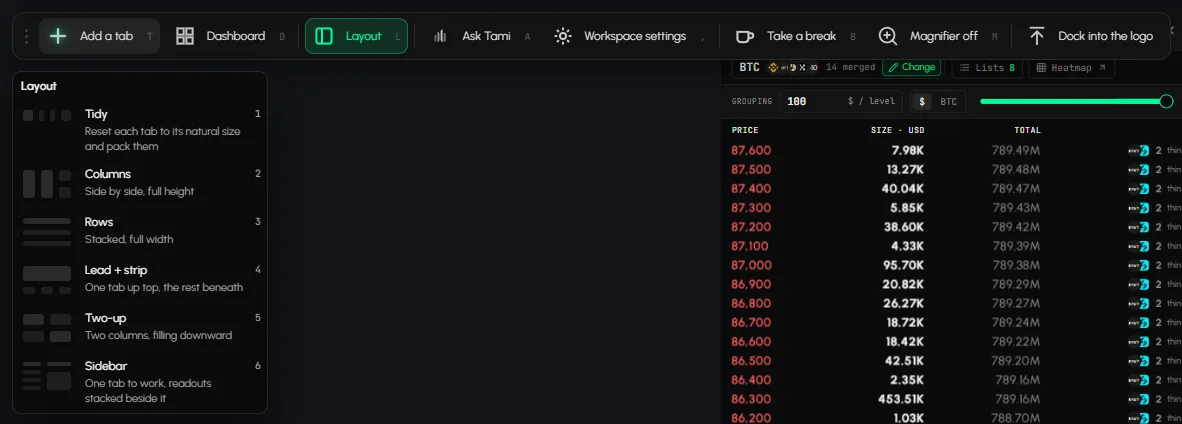
To rename a tab, click the pencil next to its title. Adding, closing, moving and resizing tabs is saved with the workspace automatically. See Arrange tabs.
How do I name and style my workspace?
- Open Workspace settings on the tool rail, or press ,.
- Under Details, set the workspace name and description.
- Click Save & Close.
To change the look (background, font, skins), see Workspace settings.
A first layout to try
Start from BTC depth. Then add Charts with Add a tab and point it at the same coin.
Tips
- Start small: three or four tabs read better than ten.
- Press L then 1 (Tidy) if tabs overlap.
- Not sure which tab does what? Hover it in the Add a tab catalog for a preview and ready-made presets.
Frequently asked questions
Can I have more than one workspace?
Yes, up to 4. Create another from the Dashboard or from the workspace switcher in the header, and switch between them there. See Manage your workspaces.
Can I rename a workspace?
Yes. Open Workspace settings and change the name under Details.
Can I undo closing a tab?
Yes. A message appears after closing with an Undo button.