Alerts & Notifications
How to send crypto alerts to Discord, email or push
Personal alerts can reach you in Discord by webhook, as well as in the app, by email and by push. Set minimum sizes, batching and quiet hours once, and they save as you change them. Market-wide alerts come through our public Telegram channel.
On this page
What you can do
- Set a minimum size for wallet events and for whale prints.
- Batch small alerts into a digest, and protect yourself from repeats.
- Turn on quiet hours.
- Choose delivery: in the app, a toast on the canvas, sound, email, push or Discord.
- Choose a default coin filter for whale alerts.
Settings save as you change them. The drawer says "Live - nothing to save".
How to open Alert Settings
- Click Alerts in the sidebar.
- Click Alert Settings (top right of the page). A drawer opens on the right. You can also click the gear in the bell panel in the top bar. It opens the same drawer, titled Alert settings.
- Pick the tab you want to set: All, Favorites or Whale. The drawer is titled "Settings" with the tab name.
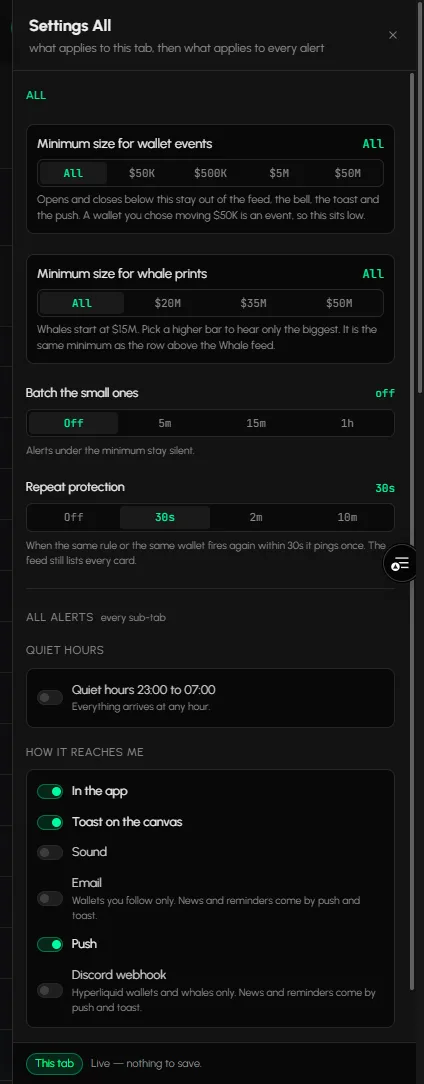
How to set the sizes and the volume of alerts
On the All tab:
- Minimum size for wallet events: All, $50K, $500K, $5M or $50M.
- Minimum size for whale prints: All, $20M, $35M or $50M. The drawer notes that whales start at $15M.
- Batch the small ones: Off, 5m, 15m or 1h. Small alerts are grouped instead of sent one by one.
- Repeat protection: Off, 30s, 2m or 10m. The same alert is not repeated inside that window.
On Favorites: the minimum for wallet events and Batch the small ones.
On Whale: Minimum size, Batch the small ones and Default coin filter: All, BTC, ETH, SOL or HYPE.
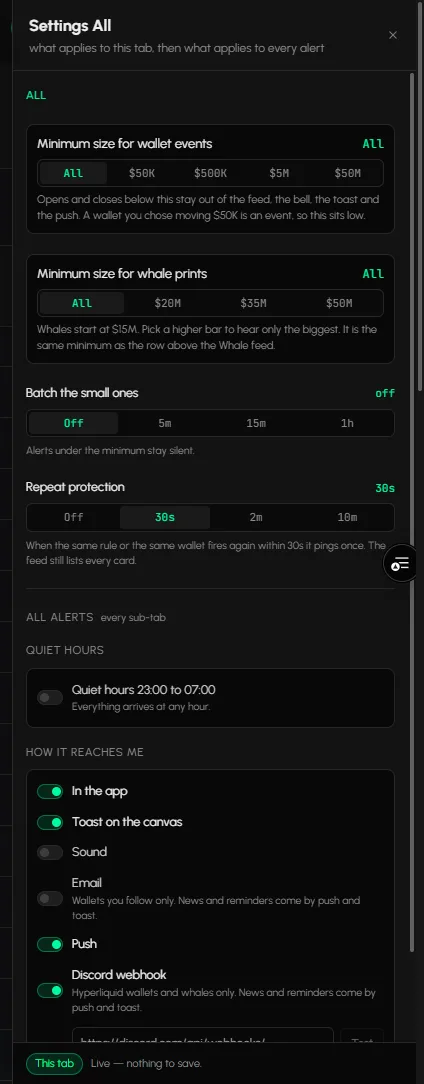
How to turn on quiet hours
Under ALL ALERTS, switch Quiet hours 23:00 to 07:00 on. The window is fixed. The drawer has no time controls, so you can't change the hours there. While the switch is off, the drawer reads "Everything arrives at any hour".
Where can an alert reach me?
| Channel | What it is | Which alerts |
|---|---|---|
| In the app | The alerts feed, the bell and the Alerts page | Your alerts |
| Toast on the canvas | A popup while you work in a workspace | Your alerts |
| Sound | A sound when an alert arrives | Your alerts |
| An email to your account address | Wallets you follow only | |
| Push | A browser notification, also when the tab is closed | Your alerts, news and reminders |
| Discord webhook | A message in your Discord channel | Hyperliquid wallet alerts and whale alerts only |
| Telegram | A public channel anyone can join | Market-wide alerts for everyone, not your personal alerts |
All of these work. The next sections show where to switch each one on.
How to choose where alerts go
Under ALL ALERTS, the delivery switches are:
- In the app: the alerts feed, the bell and this page.
- Toast on the canvas: a popup while you work in a workspace.
- Sound: a sound when an alert arrives.
- Email: for the wallets you follow only. Emails go to your account address.
- Push: a browser notification, even when the tab is closed. Allow notifications when your browser asks, and check that Do Not Disturb is off.
- Discord webhook: a switch for Hyperliquid wallet alerts and whale alerts only. News and reminders come by push and toast.
How to send alerts to Discord
- In Discord, open Server Settings, Integrations, Webhooks and create a webhook for your channel. Copy its URL.
- In Alert Settings, switch Discord webhook on. The switch is off by default.
- Paste the URL into the Webhook URL field. The field shows once the switch is on.
- Click Test Webhook. A test message should appear in your channel.
- Keep the switch on. The webhook field is hidden while it is off.
Tip: use a channel only you and your team can read, because alerts show wallet and trade details.
Where else can I open these settings?
The Alerts tab in a workspace has a gear that opens the same kind of panel for the sub-tab you are in. The panel footer says that anything read there counts as read on the bell, and the other way round. See How to use the Alerts tab.
Market-wide alerts on Telegram
Telegram is a public broadcast channel. Anyone can join. It carries market-wide alerts for everyone and does not send your personal alerts. Join: t.me/Tabmydata.
Frequently asked questions
How do I set up a Discord webhook for crypto alerts?
Create a webhook in Discord (Server Settings, Integrations, Webhooks), switch Discord webhook on in Alert Settings, paste its URL and click Test Webhook.
Can I get push notifications?
Yes. Switch Push on and allow notifications in your browser.
Can I get my personal alerts on Telegram?
No. Personal alerts arrive in the app, by email and push, and in Discord by webhook. Telegram is a public channel for market-wide alerts.
Do alerts keep running when I close the page?
Yes. Your settings keep running, and the bell counts what arrived.
Can I change the quiet hours?
No. The window is fixed at 23:00 to 07:00. You can switch it on or off.
Is Telegram a delivery option for my own alerts?
No. Telegram is only the public channel for market-wide alerts.
What does batching do?
It groups small alerts, so you get one summary instead of many messages.