Workspaces & Tabs
How to open details in the side panel (detail dock)
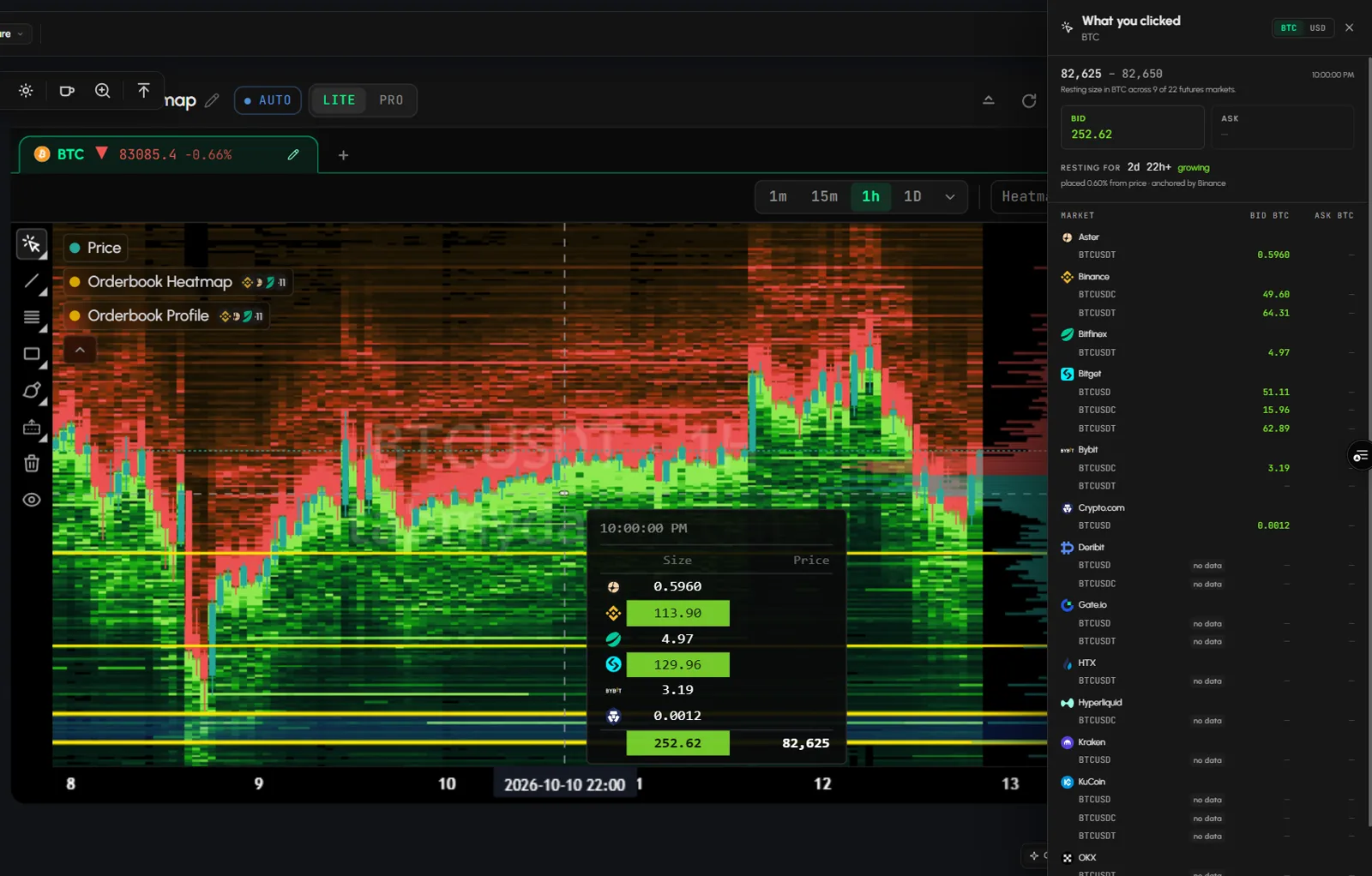
In Tabmydata, many tab actions open a side panel on the right of the screen. Click a price level, a heatmap cell or a trader row and its full detail opens next to your workspace; click Close panel to return. The panel is the detail dock.
On this page
How do I open the detail dock?
- Click an item in the tab: a price level in the Orderbook, a level on the Orderbook Heatmap, or a trader row in Hyperliquid Whale Tracker.
- The dock opens as a panel at the right edge of the screen, full height, with that item's detail.
- Click another item to switch the dock to it.
Which panels open in the dock?
- Orderbook: click a price level and the Size by exchange panel opens with the total size at that level, each exchange with its size and share, and a line per market.
- Hyperliquid Whale Tracker: click a row and the Trader overview opens with the account's bias, history, leverage and open positions.
- Orderbook Heatmap: click a cell to open What you clicked. The panel also holds Field settings and Change the asset.
- Orderbook, Trades, Liquidations and Coin Info: the coin or symbol picker opens in the panel.
- Charts: the indicator library and layer settings open in the panel.
- Alerts: New alert and Settings open in the panel.
- Any tab: Edit appearance (from the More menu) opens in the panel. See Tab skins and colours.
How do I switch sections inside the dock?
Some docks have sections. In the Orderbook Heatmap dock, switch between Level, Book and Assets.
How do I close the detail dock?
Click Close panel at the top of the dock. In the Alerts panels you can also press Esc. Your workspace and tabs stay as they were.
Tips
- Leave the dock open and click another item to switch it. You do not need to close it first.
- The panel opens outside the tab, at the right edge of the screen, so your tabs stay where you put them while you read the detail.
Frequently asked questions
What is the detail dock?
A side panel that opens at the right edge of the screen when you click an item in a tab. It shows that item's full detail, or a picker or settings, next to your workspace.
Can I keep the dock open while I click other items?
Yes. Click another item and the dock switches to it.
How do I close the detail dock?
Click Close panel at the top of the dock.
Which tabs have a detail dock?
Orderbook, Orderbook Heatmap, Hyperliquid Whale Tracker, Charts and Alerts, plus the coin picker in Orderbook, Trades, Liquidations and Coin Info.
Does the dock change my tab layout?
No. It opens outside the tabs and closes the same way.