Account & Settings
How to take a screen break
Take a break stops your tabs updating for 15 minutes so you can step away from the screen. Alerts keep arriving, silently.
On this page
What you can do
- Start a 15-minute break from the tool rail, the keyboard or the sidebar menu.
- Keep receiving alerts while your tabs rest.
- Earn the First Break badge on your first completed break.
How to start a break
Use any of these:
- Click Take a break on the tool rail in a workspace.
- Press B.
- Click your name at the bottom of the sidebar and choose Break.
Then:
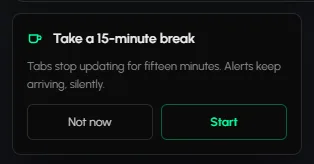
- The Take a 15-minute break dialog opens: "Tabs stop updating for fifteen minutes. Alerts keep arriving, silently."
- Click Start to begin, or Not now to close it.
What happens during a break
A full-screen overlay covers the canvas with a countdown in minutes and seconds. Your tabs stop updating. Your alert settings keep running, and alerts keep arriving without sound or popups. If you reload the page during a break, the overlay stays.
How to end a break
You don't. The break ends by itself after 15 minutes. The overlay changes to "Break over! Welcome back", and the app is usable again. You don't need to click anything. Pressing Escape does not end a break early.
Frequently asked questions
Do alerts reach me during a break?
Yes. They keep arriving, silently.
How long is a break?
Fifteen minutes.
Can I end a break early?
No. Escape does not end it. It finishes by itself at 15 minutes.
Is a break the same as pausing one tab?
No. A break stops all your tabs. To pause one tab, see Tab controls.
Do breaks earn badges?
Yes. Your first completed 15-minute break earns the First Break badge. See Badges and achievements.