Account & Settings
How to turn friend requests on or off
To turn Tabmydata friend requests on or off, open Profile Settings, go to the Social section, switch Allow Friend Requests and click Save. With it off, other members cannot send you new requests. Blocking one member and hiding profile details are separate settings.
On this page
What you can do
- Allow or stop new friend requests with one switch.
- Keep your profile as it is.
Who should turn friend requests off?
Use it if you want to stop new friend requests from everyone, without blocking anyone and without changing what others see on your profile. It is one switch, and you can flip it back whenever you like.
How do I change who can add me?
- Click your avatar in the top bar and choose Profile Settings.
- Open the Social section. On a phone, the sections show as a dropdown.
- Turn Allow Friend Requests on or off.
- Click Save.
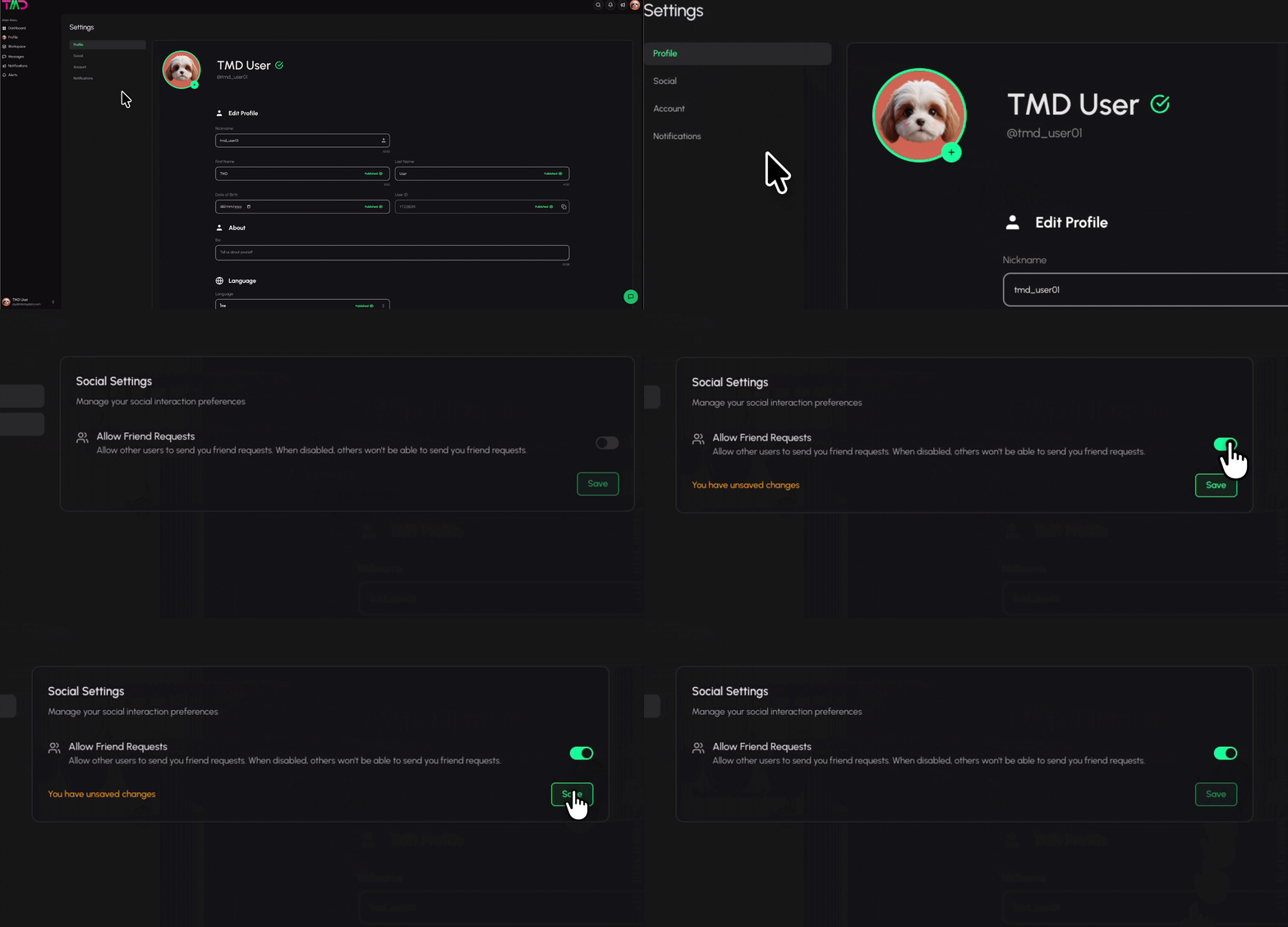
What does the switch do, and what does it not do?
- It controls new requests. With Allow Friend Requests off, other members cannot send you friend requests.
- It is not a block. To stop one member, use Block and unblock a member. To remove one friend, see Add and manage friends.
- It does not hide your profile. What others see is set in Profile Visibility. See Edit your profile and avatar.
- Email about requests is separate. See Choose which notifications you get.
Which setting is for which job?
| You want to | Use |
|---|---|
| Stop all new friend requests | Allow Friend Requests in Social settings (this page) |
| Stop one member only | Block them |
| Remove one friend | Manage your friends |
| Change what others see about you | Profile Visibility, in Edit your profile |
| Stop emails about requests | Notification settings |
After you change it
Click Save. The switch applies to new requests from that point on. Turn it back on with the same switch whenever you want to be found again.
Frequently asked questions
Do I need to click Save after I change the switch?
Yes. Turn Allow Friend Requests on or off, then click Save.
Does turning requests off hide my profile?
No. The switch only controls new friend requests. What others see on your profile is set in Profile Visibility.
Where do I find Social settings?
Click your avatar in the top bar, choose Profile Settings and open the Social section.
Can I turn it back on later?
Yes. Use the same switch.
How do I stop one person instead of everyone?
Block them. See Block and unblock a member.