Troubleshooting
How to fix data that is not loading
Prices, trades or the order book stopped updating? Work through these checks in order. Most frozen tabs are paused, or one exchange is down.
On this page
What you can do
- Tell a loading tab from an empty one.
- Read the exchange status of every exchange that feeds your tabs.
- See how many feeds are healthy in the status strip.
- Resume a paused tab, refresh it, or re-add it.
What does a tab show while it loads?
While a tab's data loads, it shows the letter T (the Tabmydata logo) bouncing slowly in a loop, like a ball. It stays until the data arrives. If it keeps bouncing for a long time, work through the checks below.
A tab with no coin yet is not loading. It shows an empty state instead:
| Tab | What it says |
|---|---|
| Liquidations | "Nothing on the tape. Choose a coin and its futures markets, and every forced exit lands here, newest on top." with Pick a symbol |
| Trades | "Nothing on the tape. Choose a coin and the markets to merge, and every print lands here, newest on top." with Pick a symbol |
| Orderbook | "Nothing in the book. Choose a coin and the markets to merge, and the book fills from the price out." with Pick a symbol |
| Watchlist | "No tickers available yet." with a + button |
| News | "No news matches your filters. Try adjusting your filters." |
Other things you may see:
- Heatmap: after you change the time frame, the tiles stay one dark colour for a couple of seconds while the new data arrives.
- Orderbook: after a page reload it fills in about two seconds.
- Liquidations: Refresh and a page reload empty the table, and it refills from the live stream.
- Coin Info and Market Clock: if a data source is slow, the screen still loads.
How to check the exchange status
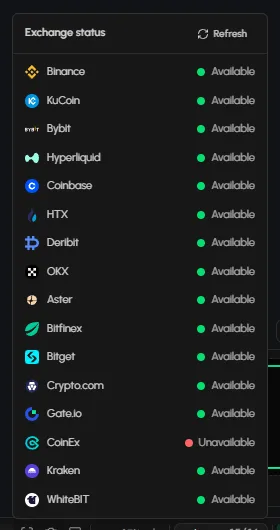
- Look at the status chip in the bottom bar. Hover it: it reads "Exchange status: All available" when every feed is up, or for example "Partial outage".
- Click the chip. Each exchange is listed as Available or Unavailable. Click Refresh to check again.
- If an exchange is Unavailable, tabs that use it can stall until it is back.
How to read the Issues strip
At the bottom left, Issues shows two numbers, for example "15/16", with the tab count and a list link. It is the health of the feeds your tabs use. Click list to see them.
How to check if a tab is paused
- In the title bar, look at the round button. It reads Pause this tab's feed while live and Resume this tab's feed when paused.
- If the tab is paused, click it to resume.
How to refresh a tab
- Click Refresh in the title bar, or in More (...).
- Still nothing? Close the tab and add it again with + on the tool rail. Click Undo right after closing if it was a mistake.
How to check your connection
Tabmydata streams live data over a WebSocket connection. A dropped or unstable network is the most common reason a feed stops. Reload the page once your connection is stable.
How to rule out your browser
A stale cache or an extension that blocks WebSocket traffic can stop data. Open the workspace in a private window or another browser.
How to check if one exchange is the problem
If one exchange is missing while the rest update, open the tab's Change panel, remove that exchange, and add it back when the status shows it as Available. See Choose coins and exchanges.
Frequently asked questions
Why is my chart blank?
Check the exchange status, click Refresh in the tab, then check your connection.
Why is my order book not updating?
One selected exchange may be unavailable, or your connection dropped.
What is the bouncing T?
It is the loading indicator. The tab is waiting for its data.
What does the chip in the bottom bar mean?
It is the exchange status. Click it to see each exchange.
Still stuck? Contact support.